
Avoxkit · Trim · Timeline

Trim clips,
start on a keyframe.

Drag two handles on a thumbnail timeline to pick a segment and save it as its own video. The start snaps to the nearest keyframe, the end is cut by time, and the segment is re-encoded as H.264 with AAC in the container of your choice. Files stay on this machine, free.

  • Same-as-source / MP4 / MKV / MOV
  • Starts land on keyframes · segment preview
  • Free · local
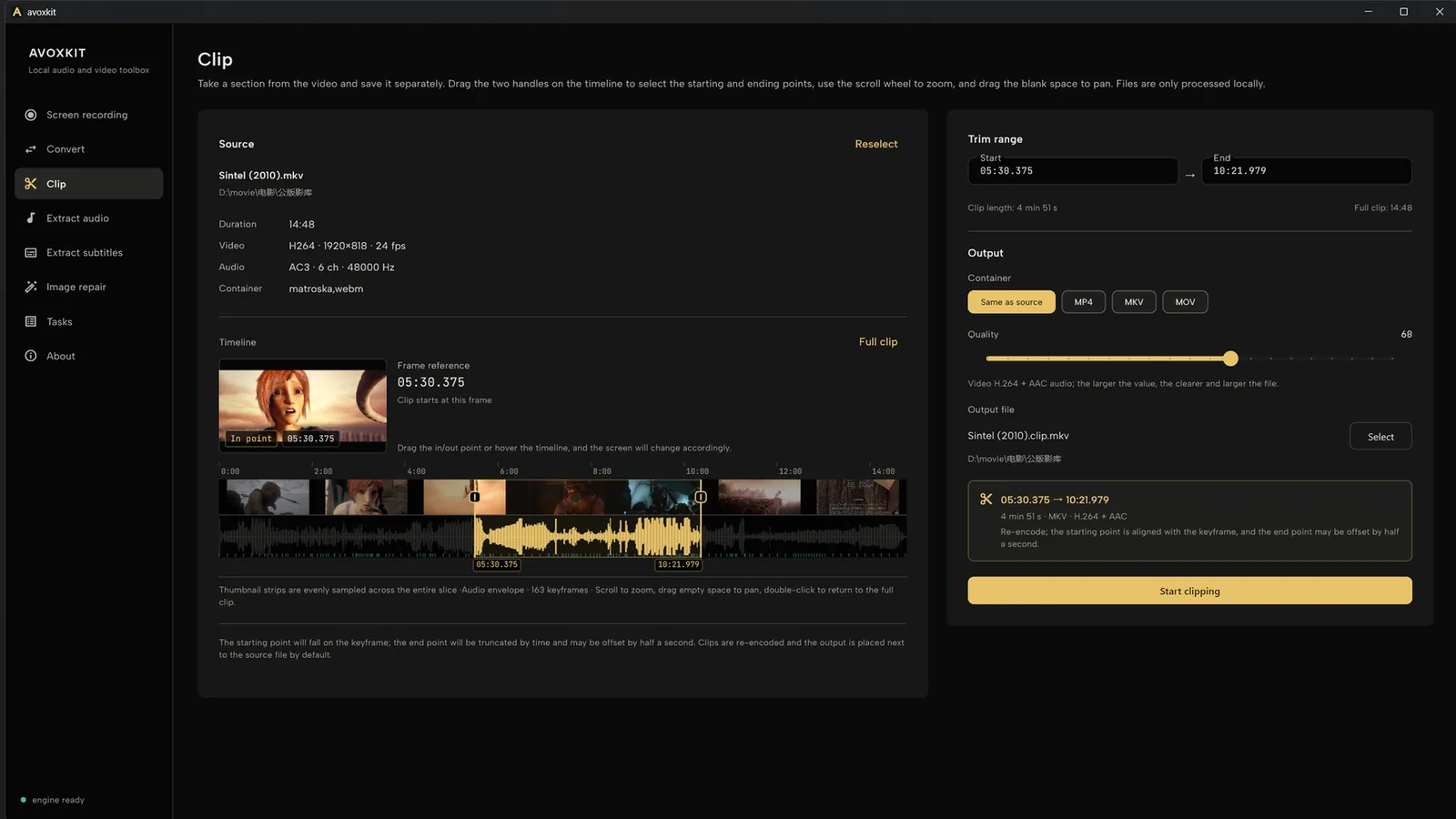
Avoxkit trim page: source file and 05:30 to 10:21 trim range on the left, output settings on the right

How it selects

Pick by eye, not by guess

The whole job is getting the two points right. The timeline lays the whole video out so you do not have to guess numbers.

Thumbnail timeline

The whole video sits on the timeline as a filmstrip, the audio envelope is drawn when a track exists, and keyframes show as short ticks. Drag two handles to pick the range, zoom with the wheel, pan by dragging empty space.

The start snaps to the nearest keyframe before your target

Saved as its own clip

Container: same as source, MP4, MKV or MOV; a quality slider sets sharpness against file size, video H.264 with audio AAC. Once a file is picked, the interface previews the segment you are about to save.

Output lands next to the source

Free

Trimming costs nothing, with no count limits and no watermark on output.

Local

Files are read and written on this machine, never uploaded.

Preview

See exactly the segment you are about to save — no export-and-check loop.

Limits

Edges, stated up front

Not lossless cutting.Segments are re-encoded as H.264 with AAC at a chosen quality; the end is cut by time and can be off by under half a second.

Single file only.Convert, extract audio, extract subtitles and image repair batch by folder; trimming does not.

Not an editor.No multi-track timeline, playhead or effects; for editing work use dedicated software.

Quality trades size.Higher slider values are sharper and bigger; pick per use.

Get

Three steps

Current release 0.2.0 for Windows 64-bit and macOS (Apple Silicon), entirely free.

  1. Open a video.
  2. Drag the two handles on the timeline to pick start and end.
  3. Save; output lands next to the source.

Download from GitHub Releases, or see the Avoxkit home page.

Requirements

  • Windows 64-bit; macOS (Apple Silicon)
  • mkv, mp4, mov, avi, ts, webm and other common containers
  • Trimming runs fully offline

Trimming and encoding are done by the open-source engine avox; the UI is built with Flutter. Avoxkit is AGPL open source on GitHub.

FAQ

Is trimming lossless?

No. Segments are re-encoded as H.264 with AAC, quality adjustable; the start lands on a keyframe and the end is cut by time, off by at most half a second.

Why does the start snap to a keyframe?

Playback can only start cleanly from a keyframe. After snapping, the time shown is the real start of the output — no segment that opens on a black or corrupted frame.

Does it batch?

Trimming is single-file; folder batches live in convert, extract audio, extract subtitles and image repair.

Do files get uploaded?

No. Trimming happens on this machine; the app has no telemetry or auto-upload logic, and needs no account.