The rhythm of two chains: video by frame rate, audio by the device
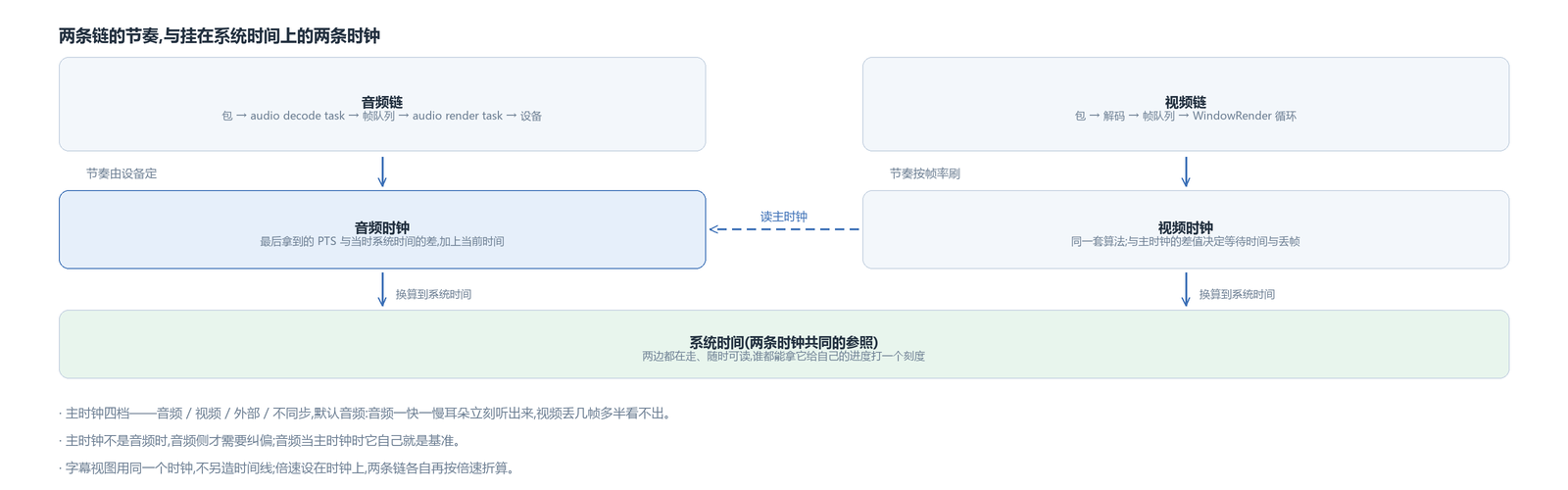
The video side refreshes by frame rate. The render loop computes how long a frame should show and swaps to the next when the time comes; the player schedules the rhythm itself. The audio side's rhythm is not in the player's hands: once data is handed to the device, when it comes out of the speaker is up to the device, and all the player can ask is how much is still queued and unplayed.
So both chains answer “where is playback now”, but the answers are of a different nature. The video side is a position derived from the frame sequence; the audio side is a position derived backwards from the device buffer level. Each has its own error, and both drift. To line picture and sound up, there first has to be a common reference that both chains can be converted onto.
The reference is system time. There is no mystery to the choice: it runs on both sides, can be read at any moment, and either side can use it to stamp its own progress.
Three things stored in the clock: PTS, system time and the difference
Every track object carries a clock. The clock stores the last PTS it received, the system time read at that moment, and the difference between the two.
“Where playback is now” does not use a timer; it is computed on each query: add the difference to the current system time and that is the answer. The result is that the clock keeps running while the track has no data, and when data arrives and a new PTS is written in, the clock is calibrated again.
The clock has a speed of its own. At non-standard playback speed, elapsed system time is multiplied by the speed before progress is computed, so “where playback is now” follows the speed too. At the clock layer, changing speed is just changing a variable; the render interval and the audio data amount are each scaled from it.
When resuming from pause, the reference has to be anchored again. Without re-anchoring, the paused time is counted into playback progress, and progress jumps forward by that much when playback resumes.
Audio is the master clock by default
The master clock has four options: audio, video, external, and no sync. Audio is the default.
The reason comes from the difference between the senses. The ear notices immediately when audio drops a frame or changes tempo slightly; the eye mostly does not notice when video drops a few frames or jitters in interval. Making video accommodate audio costs less.
The audio track hands its value to the player when its own clock updates; when audio is master, the video track conversely reads the master clock and uses it as its reference. The subtitle view takes the same clock and does not build a separate timeline — subtitles and picture use the same scale, so keeping time comes down to the account between the two chains.
Video side: the tolerance follows the frame interval
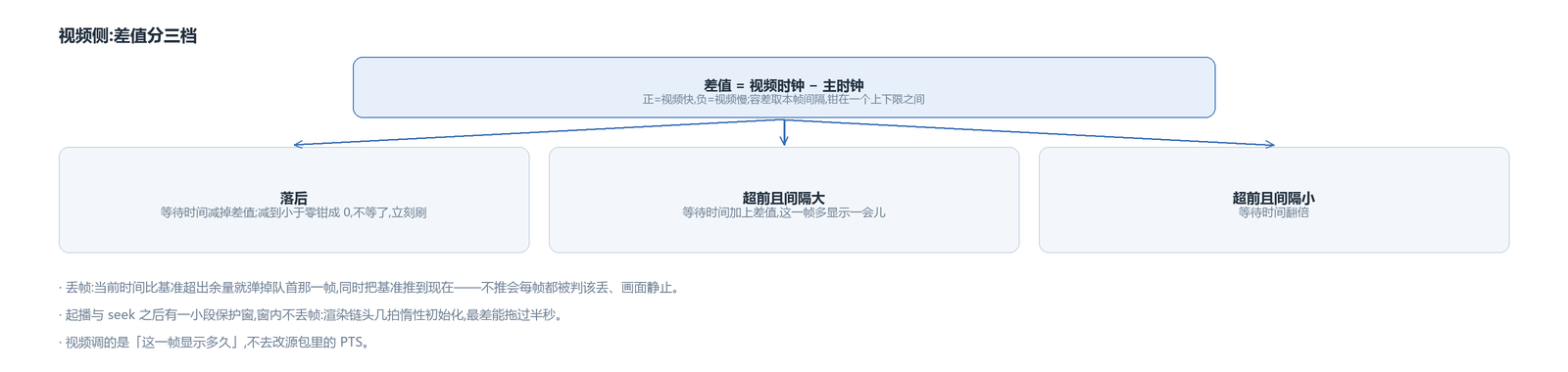
The video track subtracts its own clock from the master clock. A positive difference means video is ahead, a negative one means video is behind. The tolerance for “is this a difference at all” is not fixed: it is this frame's own interval, clamped between a lower and an upper bound — the lower bound is under one frame, the upper bound is the hundred-millisecond range. Frames with short intervals get a tighter tolerance, frames with long intervals a looser one.
The difference is handled in three ways:
- Video is behind: subtract the difference from the wait time; if that goes below zero, clamp to zero, meaning do not wait any longer and refresh the next frame immediately.
- Video is ahead and the previous frame's interval was large: add the difference to the wait time, so this frame shows a little longer.
- Video is ahead but the previous interval was small: double the wait time.
When the wait time is used up, the render reference advances one step by the interval scaled for playback speed. There is a guard here: if the current system time has left the reference behind by more than the upper bound, the reference is pulled straight back to the current time. Otherwise the error accumulates step by step and drifts further and further.
When it truly cannot keep up, frame drops solve it: if the current time exceeds the reference by one and a half frames, pop the front frame of the queue. Dropping is something that has to be done explicitly on hardware-decoded frames — there is a GPU resource behind the frame, and the frame object has to be told to release when it is popped, or using that index later goes wrong.
Frame drops carry a trap with them. Once the lag is large enough that the wait time is clamped to zero, the reference itself does not advance, and the “pull the reference back to current time” guard only takes effect when the wait time is greater than zero — put the two together and the current time runs further and further ahead, so every frame is judged droppable, the picture freezes completely, and it only recovers briefly after a seek resets the clock. So when dropping a frame, the reference must be pushed to now at the same time, and the same path returns a “slow” signal that lets the window skip this frame's wait and refresh immediately: without that signal the window's wakeup beat is pinned by the frame-rate label, and a lag can never be caught up.
After playback starts and after a seek there is a short guard window during which no frames are dropped. The first few beats of the render chain are lazily initialized — video device creation, shader compilation and graphics device graph building are spread over the first beats, measured to stretch past one hundred milliseconds, with the worst beat over half a second. Without this window those beats would be taken as severe lag, frames would be dropped away first, and the first frame would take a long time to appear.
Audio side: what changes is the amount of data sent out

When audio is the master clock it needs no correction; it is the reference itself. When the master clock is not audio, audio has to accommodate, and the method is entirely different from the video side.
The audio track compares its own clock with the master clock, but does not look at a single difference. A single difference jitters badly, so it applies exponential smoothing and looks at the average error after enough samples; only when the average error exceeds the tens-of-milliseconds range does it decide to act.
Acting means changing the amount of data sent out this time: convert the error into a number of samples, add it to this fixed-length frame, run it through the resampler at the adjusted sample rate, and only then send it into the device. The amount of change is also limited, to at most one tenth of the frame length, so it does not jump too far at once — correct too aggressively and the sound audibly speeds up and slows down.
If this path stays active for a long time, the two clocks are drifting apart; a line is logged at intervals to leave a trace for investigation.
For sources that do not line up, sync is simply turned off
Some sources are misaligned from the start, and forcing them to line up is pointless, so the player turns sync off entirely. The verdict looks at two things:
One is the time difference between the two axes. If the decode output time difference between audio and video exceeds twice the cache target, and the render time difference also exceeds one cache target (the cache target order of magnitude), it counts as misaligned. The other is that the audio's PTS span does not match its data amount — for example, the PTS has advanced one second while only half a second of data is in hand; with such a source the audio clock itself is untrustworthy, and it is judged misaligned as well.
Turning off sync is not the same as turning off the clock. The player's own clock is fed by the video track instead, the progress bar follows video, and the picture keeps refreshing at its own rhythm. The setting before it was turned off is remembered and restored once the source lines up.
Sync is also turned off above 4x speed: at that setting audio packets are already being dropped and video decodes only I-frames, so there is nothing to compare against. When dropping back from above 4x to within 4x, a seekable source repositions once according to the current render time — during the above-4x period audio packets were dropped and the read position ran ahead; without repositioning, the audio's position on recovery would not match the picture, and the progress bar would jump back and forth.
Automatically speeding up when the backlog is too large
Queue backlog is quantified as duration, in two parts: how far the read position in the packet queue leads the decode position, and how far the decoded position in the frame queue leads the render position; the two add up to how much has accumulated. Above the cache target it enters buffering state and pauses rendering and the clock; the recovery threshold is the same amount, and the clock is re-anchored on recovery.
There is a case this does not cover: a source that wants to start instantly dumps a large chunk of data as soon as it connects, and at normal speed the latency stays high. So the low-latency setting also carries an adaptive rule: during playback, when the backlog on both the audio and video sides exceeds twice the cache target, the speed is automatically raised to a setting slightly above 1x (configurable) to burn off the backlog, and returns to normal speed when either side drops below the cache target.
This adaptive rule runs only when the current speed is normal and the user has not chosen a speed. The user's setting takes priority; it will not override it.
The avox engine is open source on GitHub: github.com/xxxzhou/avox, and the clock, the sync verdict and the corrections on both sides are all in there.