Raw frame sources and encoded-data sources sit on two branches
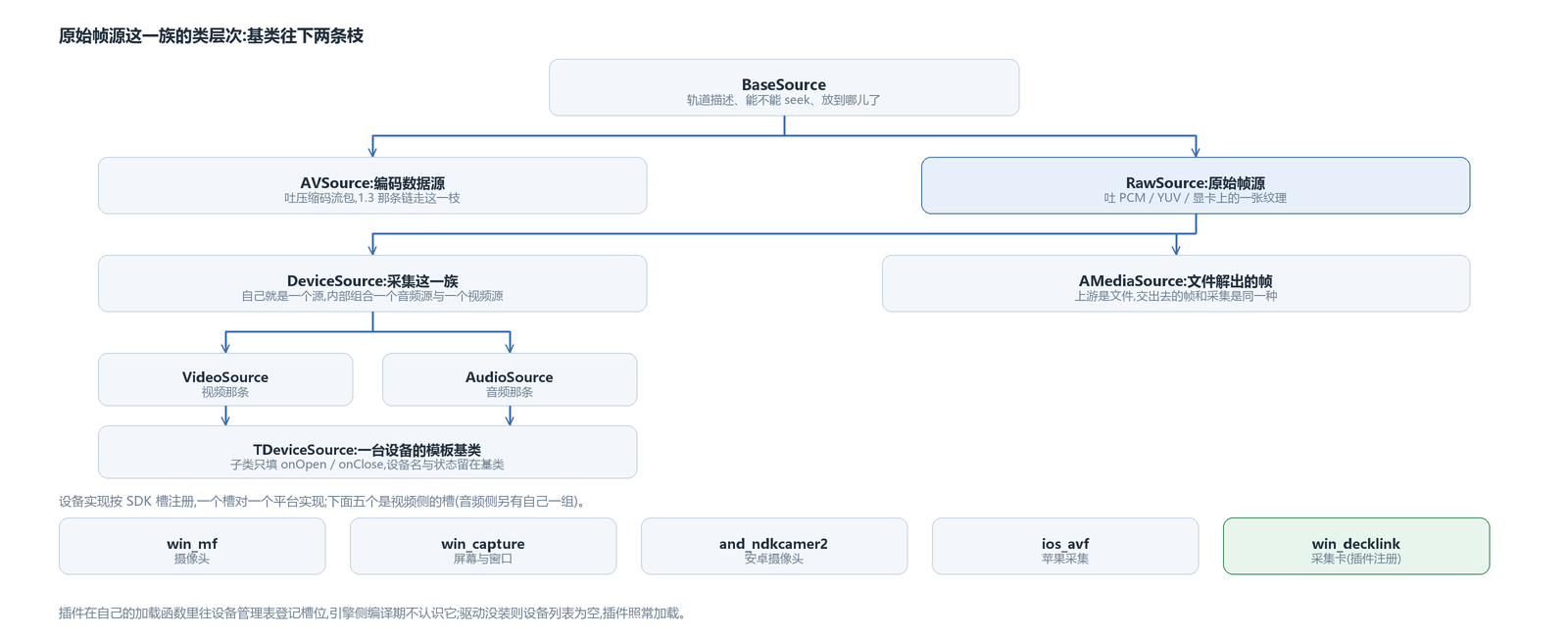
Both chains share one base class, BaseSource, which holds what both sides need: track descriptions, whether seeking is possible, and how far playback has got. Below it the tree splits into two branches. One is AVSource, which hands out compressed bitstreams — the data-source article was about it. The other is RawSource, which hands out data that is ready to use.
The name RawSource corresponds to one criterion: if you have PCM, YUV, or a texture on the graphics card in hand, it can serve as a source, and processed data of this kind can also be fed to an encoder. The entry point of the recording chain sits on this family.
Below this family comes capture. DeviceSource is itself a source; internally it combines an audio source and a video source and forwards the frames from both together. The audio and video branches each split further: the video one is VideoSource, the audio one is AudioSource. Each has a template base class below it that handles the single-device concern: a device implementation fills in only two hooks — what to do on open and what to do on close; the device name, device id and open state are kept in the base class.
The file-decoding source AMediaSource also hangs below RawSource. It differs from capture only upstream: one decodes frames out of a file, the other takes frames from a device; the frames they hand out are the same kind. When the data-source article said the reverse path was almost free, it meant this family.
The extra actions at the device layer all live on the device manager: list all devices, refresh the list, find by id, take by index; the source's own interface actions are covered in the data-source article. Device category and SDK slot are two separate enums: video devices come in three kinds — camera, window, display — and audio devices in two — microphone and sound-card playback; one SDK slot maps to one device implementation, there are five slots now, and which one is the default is decided by the current platform. The device id is defined by the implementation itself: the capture-card branch uses the model name plus a topology number, so multiple cards of the same model can still be told apart.
The three frame forms and buffer types
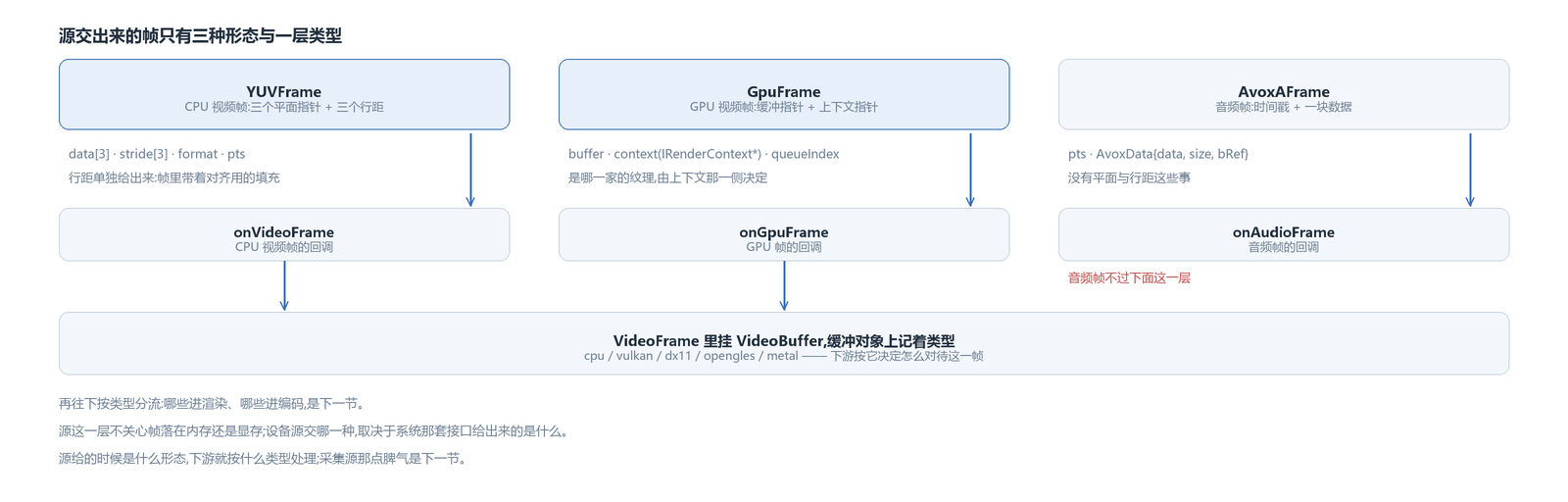
A source's output has only three forms.
A CPU video frame is a YUVFrame: three plane pointers, three strides, a pixel format, a timestamp. Strides are given separately because frames usually carry alignment padding; reading data by width times height would go wrong, so you have to walk row by row by stride.
A GPU video frame is a GpuFrame: an opaque buffer pointer plus a context pointer. Which vendor's object this texture is and how to use it is decided by the context side — fetching the device and fetching the texture both go through it, which is the interface of the pixel-processing role in the render-layering article. The source layer does not care whether it points at D3D11 or some other graphics object.
An audio frame is an AvoxAFrame: a timestamp plus a block of data — pointer, length, whether it is a reference. Audio has no planes and strides; one block of PCM is the whole thing.
The three forms reach the layer above through three callbacks: one for CPU video frames, one for GPU frames, one for audio frames. After opening, a source first hands over the track description once (width, height, frame rate, sample rate), then produces frames in one of the three forms.
As a video frame moves further up it gets wrapped in one more layer: a VideoFrame holds a VideoBuffer, and the buffer object records its type. There are five type values: cpu, vulkan, dx11, opengles, metal — GPU frames split into four by which vendor's object the texture is, and with the CPU frame that makes exactly five; these are not the same set as the decoder's types. The point of this layer is that downstream does not have to guess whether it is holding memory or a texture; rendering and encoding each decide how to treat it by type. Switching from software to hardware decode or the reverse changes exactly this type, and the frame object itself can be reused.
Captured frames land in memory or in a texture: downstream routes by type
Whether a given device source hands out CPU frames or GPU frames depends on what the system API provides. Cameras and microphones give frames in memory, with pixel formats in the NV12 / YUY2 class; screens and windows give textures, because system capture hands out a texture to begin with. The device source does not choose this itself; whatever comes from upstream is what it hands out.
The fork is downstream. The render chain accepts both: textures go through import, memory gets uploaded. The encode chain has to separate them — a software encoder eats CPU frames, a hardware encoder eats textures. This chapter takes the software-encode side; the side where hardware encoding replaces the encoder belongs to the per-platform hardware-encoding articles.
Capture sources share one temperament: they are real-time. The frame queue keeps only a few frames, drops the oldest when full, and dropping a frame is not an error. For recording this is a hard constraint: downstream can only follow the source's rhythm; if it cannot keep up, frames are dropped, and piling up a backlog here does not solve anything — it only stacks up latency.
The external texture entry: cross-device handles and the input layer
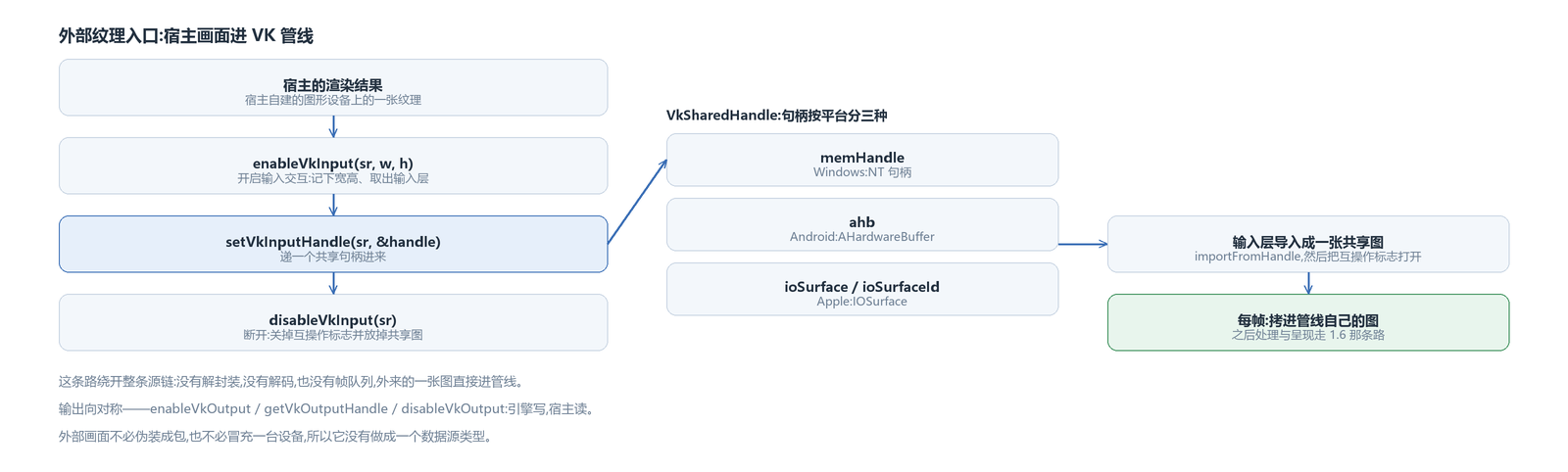
A device source comes in through the “source hands out frames” entry. There is another path that does not go through a source: a picture the host has already rendered has to get into the engine's Vulkan pipeline so filters, subtitles and compositing can be done there; the reverse also exists, where the engine hands a composited result back to the host for display. This path lives in the render layer, and its actions come in pairs: on the input side enableVkInput, setVkInputHandle, disableVkInput; on the output side enableVkOutput, getVkOutputHandle, disableVkOutput.
What crosses this boundary is not a texture object but each platform's own shared handle: an NT handle on Windows, an AHardwareBuffer on Android, an IOSurface plus its id on Apple. The handle, together with width and height, goes into one struct handed to the engine; cross-device and cross-process sharing both rely on it. The struct reserves three slots by platform, and this version ships the Windows one — how the handle is imported and how memory is bound was walked through for Windows in the article on the two destinations of hardware-decoded frames.
The input side lands on the input layer of the VK render object. Enabling it records the width and height and takes out the input layer; once the handle arrives, it is imported as a shared image and the input layer's interop flag is turned on. After that the input layer does something very short each frame: copy the imported image into the pipeline's own image; the rest of the processing and presentation follows the path described in the render-layering article.
What this path bypasses is the entire source chain: no demuxing, no decoding, no frame queue; a foreign image goes straight into the pipeline. The reason it was not made a source type is right here: a host picture does not need to disguise itself as a packet, or pretend to be a device.
The capture-card plugin: a device source registered into a device slot
Capture sources generally follow the platform: one contract, three platforms each implementing it against their own system APIs, all compiled into the engine. The contract is nothing but virtual functions, so a device source can also be made into a plugin as a whole.
That is how the capture-card path comes in: a separately built dynamic library that registers an SDK slot in the device manager table when loaded; the engine side does not know it at compile time. Device enumeration is done by the plugin itself — it reads all cards with the capture-card SDK's iterator and creates one source object per card into the list.
It fills in little. On open it looks up the closest mode in the standard table for the desired width, height and frame rate; when producing frames it copies the SDK's buffer into its own CPU frame, with the format fixed at 8Bit YUV and width, height and stride carried along; if the signal standard changes midway (a different signal source was switched in), it reopens the input itself and does not raise an error upward. With no driver installed the device list is empty; the plugin still loads as usual and does not block startup.
Threads are its own business too: the capture card's callback thread only copies frames into a queue, and pushing frames happens on its own thread — the rule from the data-source article holds here as well: whoever implements a source manages its own threads.
This path serves nicely as the example recording needs: it does not occupy the platform's device sources, and what it hands out is CPU frames, so it connects straight to software encoding.
At this point the entry to the recording chain is complete: the split into two branches, the three frame forms, one external entry that bypasses sources, plus a device source that can be made into a plugin as a whole. The next step is to run it in reverse — the playback chain takes packets in and puts frames out; recording takes frames in and puts packets out, and has to connect a software encoder. The next three articles are the three segments of this chain: frames in and packets out, packets into a file, and the target changed to a line of address.
The avox engine is open source on GitHub: github.com/xxxzhou/avox. The class hierarchy of this family, the three frame forms and that external entry are all in there.