One session, two sources
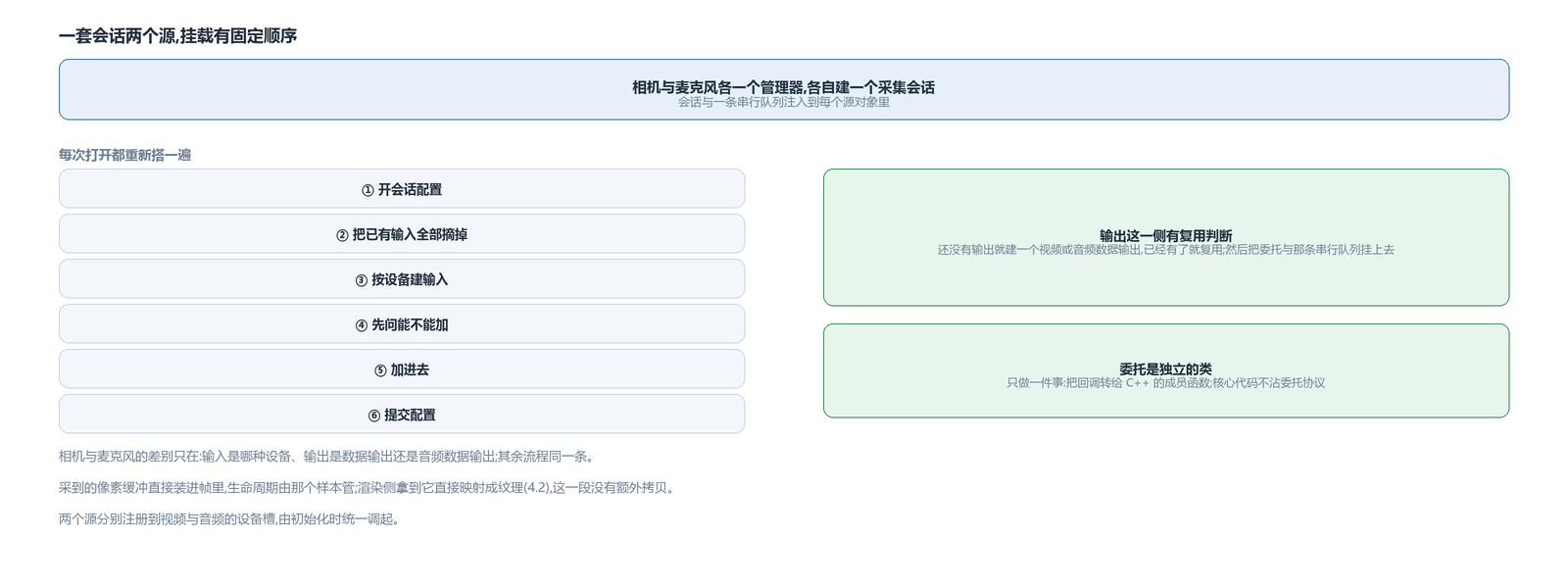
The camera and the microphone each have a manager, each creates a capture session, and injects the session and a serial queue into every source object.
Attaching inputs has a fixed order: begin the session configuration, remove all existing inputs, create an input for the device, first ask whether it can be added, then add it, then commit the configuration. Removing everything is for reconfiguration: every open builds it again from scratch.
The output side has a reuse check: if this source does not yet have an output, create a video or audio data output; if it already has one, reuse it — reuse means switching sources does not require rebuilding the output, and the delegate and queue do not need reattaching. Then the delegate and that serial queue are attached, and data comes in through the delegate.
The delegate is a separate class that does one thing: forward the callback to a C++ member function. This layer exists so the core code never touches the delegate protocol. Once both sources are created, they register into the video and audio device slots — the same table as on the other two platforms, with the upper layer taking them by slot and never needing to know which session sits underneath.
Format and orientation
The camera's available formats come from the table the device reports itself. This side likewise accepts only one planar format (two range variants) and nothing else; the tier is picked with the same scoring as on the other two ends, and the default target is given by device position — one set for front and one for back, resolution and frame rate given together, with other positions taking the first entry in the candidate table.
The session preset resolution is a separate set of fixed tiers; before setting it, it asks whether it can be set, and leaves it as is if not; the resolution the upper layer wants is matched to the nearest tier in the candidate table. The two sets are independent, so the actual output and the registered size can end up inconsistent.
The output side pins the pixel format to that one planar format, leaving nothing for the system to choose. For orientation, the front camera is mirrored and the back is not, and the orientation itself is hard-set — handling devices whose orientations differ is not finished in this version.
Callbacks, the queue and dropped frames
The delegate is attached to a serial queue, which means only one frame is in the channel at a time; if the previous segment is not done, the next waits in the queue. Whether late frames are dropped is left to the system default policy; this side sets nothing explicit.
Dropped frames are not reported: the callback only returns early on an empty sample, with no counting and no error reporting — downstream has no way to know how many were dropped at this layer or why, and can only count for itself. This differs from the Android side, where a timeout at least logs a line.
The timestamp obtained from capture is actually computed once, but what really goes into the frame is the local clock's value at that moment. That is, the time on the frame here comes from the local clock, not the presentation time from capture — the encoding article shows how the other side handles timestamps.
After device loss
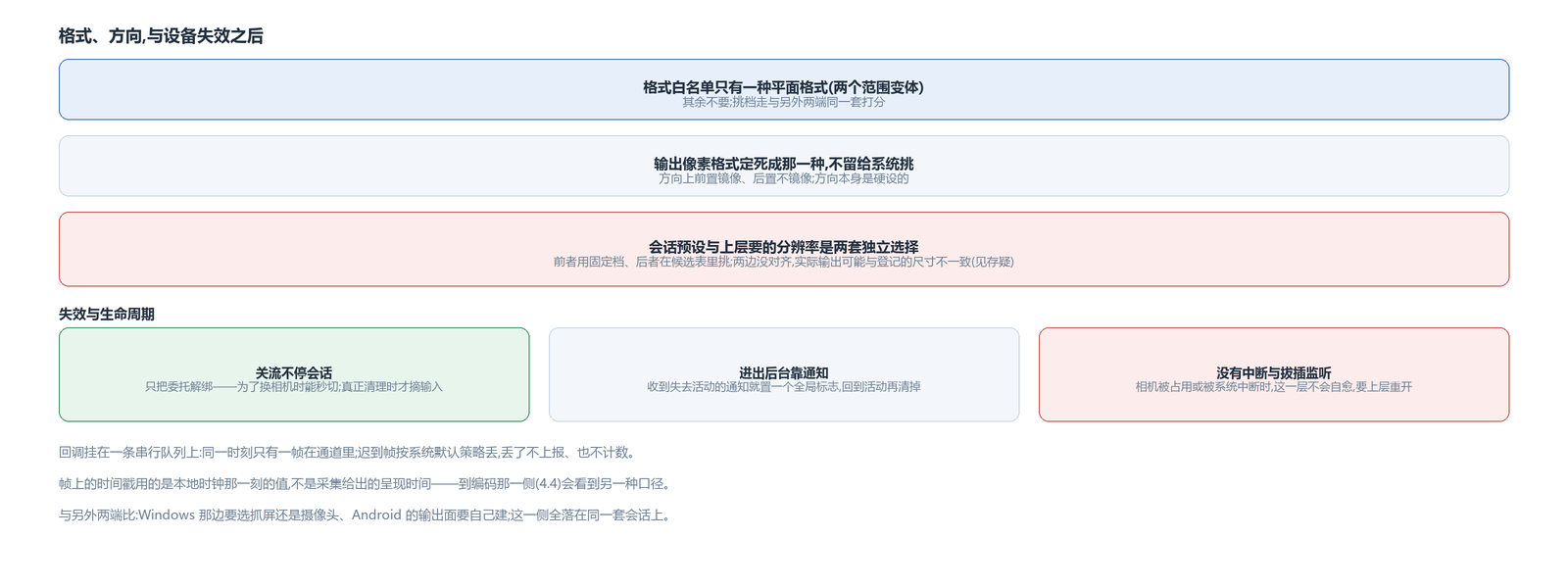
Opening means “tear everything down and reattach”: every open removes all inputs and rebuilds them, reusing the output where it can.
Closing the stream does not stop the session; it only detaches the delegate. This is so switching cameras is instant — the session keeps running and only the input changes. Staying resident has a cost: the device is held by this session the whole time, and how that coexists with other apps that want the camera has not been measured in this version; for now the trade is made in favor of fast camera switching.
Going to the background relies on app lifecycle notifications: on the notification that active state is about to be lost, a global flag is set, and it is cleared on returning to active. This is background/foreground at the global level, not a session reconfiguration at the capture layer.
There is no listener for session interruption or device removal. That is, when the camera is taken by another process or interrupted by the system, this layer does not reconfigure or reopen by itself.
Capture compared across the three platforms
The three capture paths are distributed differently across the three platforms, but they converge at the same place.
On Windows: screen and window share one capture implementation, with the system's graphics capture as the main path and GDI as the fallback; the camera goes through a separate Media Foundation path; audio has two paths, microphone event-driven and sound-card loopback polled.
On Android: the camera goes through the NDK camera API, with the output surface created on its own; audio, by contrast, lands on the Java-side recording class, read synchronously.
The Apple side has no screen-capture branch — only Windows has screen among the three paths; camera and microphone both land on the same capture session, differing only in input device and output type.
Where the three agree is the convergence point: only three forms of frame come out — texture frame, CPU planar frame, PCM data block; all converge at the single device-source inlet, then pass through the raw frame source to the upper layer; device loss is only reported, never self-healed.
The captured frame: it holds the system-provided pixel buffer directly
The frame handed out here contains the system-provided pixel buffer directly, with the format marked as the planar tier. Its lifetime is managed by that sample, so this layer does not release it by hand.
The render side receives it, treats it as a pixel buffer and maps it directly into a texture — so there is no extra copy from capture to render.
The audio path is the same, except the output is an audio data output; the audio description is converted from the first sample description the device reports, with sample rate and channel count both taken from that description.
One thing differs from the camera here: the camera tier is filtered by walking the device formats, while audio just takes the first sample description the device reports — an audio device usually has only that one sample rate and channel count, so there is nothing to filter.
The order for closing the stream: stop the task thread first, then detach the delegate (without stopping the session), and remove the inputs only during real cleanup.
The avox engine is open source on GitHub: github.com/xxxzhou/avox, where this capture session setup and the delegate bridge both live.