Three things that change: window, frame, processing
A player has to put pictures on screen on four platforms. These three things change for different reasons, and handling them together is where this layering starts.
The destination changes. On Windows it is a window handle, on Android a native window, on Apple a Metal layer, on Linux a set of its own surface interfaces.
The frame you get changes. A hardware-decoded frame lives on the platform's own graphics API — whether it is a DirectX texture, a GL external texture or a Metal pixel buffer depends on which platform is in use; a software-decoded frame lives in memory as a set of YUV planes.
The processing you want to add changes too, and it is added by the layer above at any time: scaling, super-resolution, watermarks, lookup tables, brightness, contrast, saturation, sharpness. This kind of thing has nothing to do with the platform; it has only to do with the picture.
Squeeze these three into one layer and the consequences are concrete: every processing step added means a change on each of the four platforms; every new platform means copying the whole processing chain again. Splitting them into three layers is just pulling them apart — the processing chain becomes one common chain, platform differences sink to the bottom, and the loop at the top does not need to know what type of window handle it has today.
Three roles: coordinator, pixel processing, presentation surface
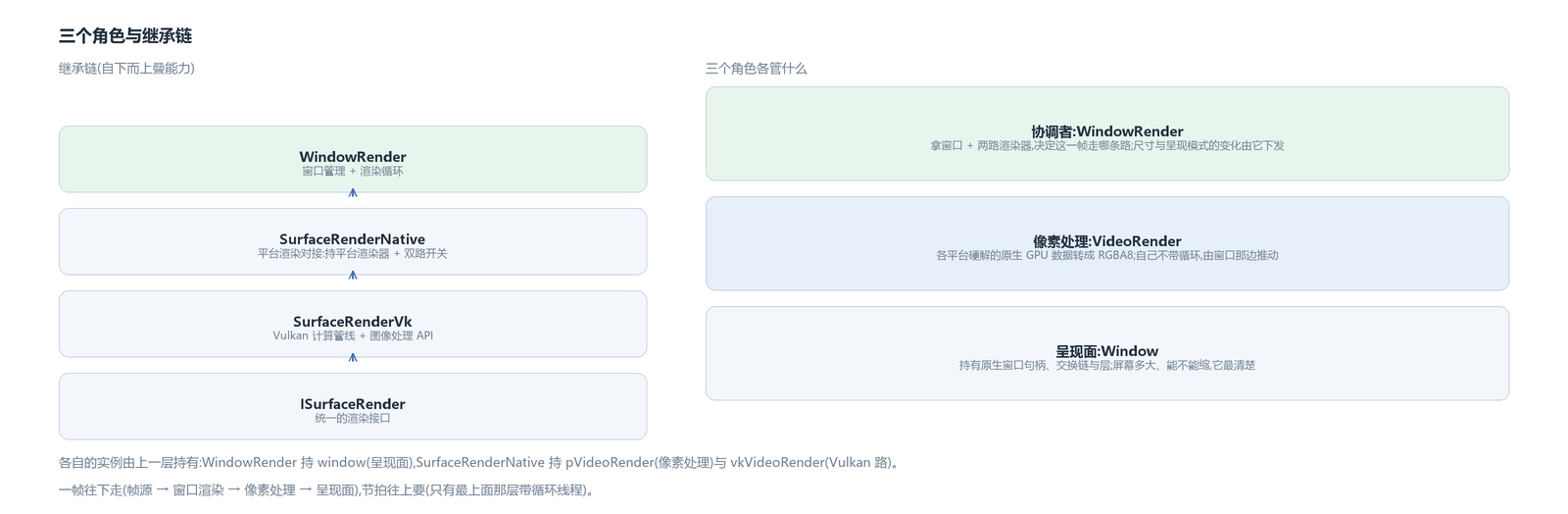
At the top is window rendering, WindowRender. It handles coordination: it holds the window object and two renderers — a platform renderer and a Vulkan renderer — and it carries a render loop. It routes and dispatches which path a frame takes, whether the window size changed, and whether the presentation mode changed.
In the middle is pixel processing, VideoRender. The native GPU data from each platform's hardware decoder is converted to RGBA8 here. It has no loop of its own; the window side drives it. Above it this line also connects a Vulkan compute pipeline layer, SurfaceRenderVk — the image-processing interfaces (scaling, super-resolution, watermark, lookup table, brightness/contrast/saturation/sharpness) hang there, and offscreen output belongs to it too.
At the bottom is the presentation surface, Window. It owns the native window handle, and the swapchain and layer objects used for presentation are in its hands too. How large the screen is, whether it can scale, whether it is currently HDR passthrough presentation — this layer knows best.
The three layers stack bottom-up in inheritance: window rendering inherits the platform render bridge, the platform render bridge inherits the Vulkan compute pipeline, and the top closes on one unified render interface. Writing it as inheritance rather than composing three components is so that a frame can be dispatched down both paths at once — the upper layer sends straight down and does not have to write another forwarding step between layers.
Data flows down, the loop thread is at the top
A frame flows downward: the frame source (the video track) hands the frame to the top layer, that layer hands it to pixel processing, and after processing it goes to the presentation surface. The rhythm goes the opposite way: pixel processing does not schedule itself; the loop at the top sets the rhythm. So of the three layers only the top one carries a loop thread; the two below are called and do not move on their own — “when to draw” and “what gets drawn” are separated this way, one layer sets the beat and the other is pushed by it.
That loop runs on its own thread, its entry is a while, and each frame's reference time starts from the current time. First it deals with two small system quirks that have to be handled on startup: Windows' default timer granularity is too coarse for high frame rates, so it is made finer before entering the loop; and when paused it cannot really do nothing — the loop keeps running, wakes every so often, and takes a look for screenshot requests, so a screenshot can still capture the current picture while paused.
A normal frame does four things in order. Compute how long this frame should last: derive an interval from the target frame rate, then divide by the playback speed; above 4x the interval is no longer shortened and the original frame interval is used (going faster is meaningless anyway). Check whether the window size changed and, if so, pass the word down (the swapchain has to be rebuilt along with it, covered later). Ask the frame source for a frame — it pulls from the frame queue, makes the audio/video sync decision, and on success calls back into this render stack. Finally, push the window to refresh: when on time or only slightly behind, let the window go through one “prepare refresh → refresh”.
Dropped frames also feed back. When the sync verdict is “late” and no speed change is active, a dropped frame is counted; if drops are clearly too frequent over a stretch and the target frame rate is still less than twice the source frame rate, the loop raises its own target frame rate by one step (up to twice the source frame rate) — chasing frames with a denser beat instead of toughing it out. The rhythm uses absolute-time alignment: next frame time plus interval, then sleep until then; if the error is absurdly large (more than twice the interval, or already past due), the reference is reset to now so it does not keep chasing one mistake after another. On Windows it also wakes two milliseconds early and spins through the tail for precision.
Two paths to the screen: one switch decides which
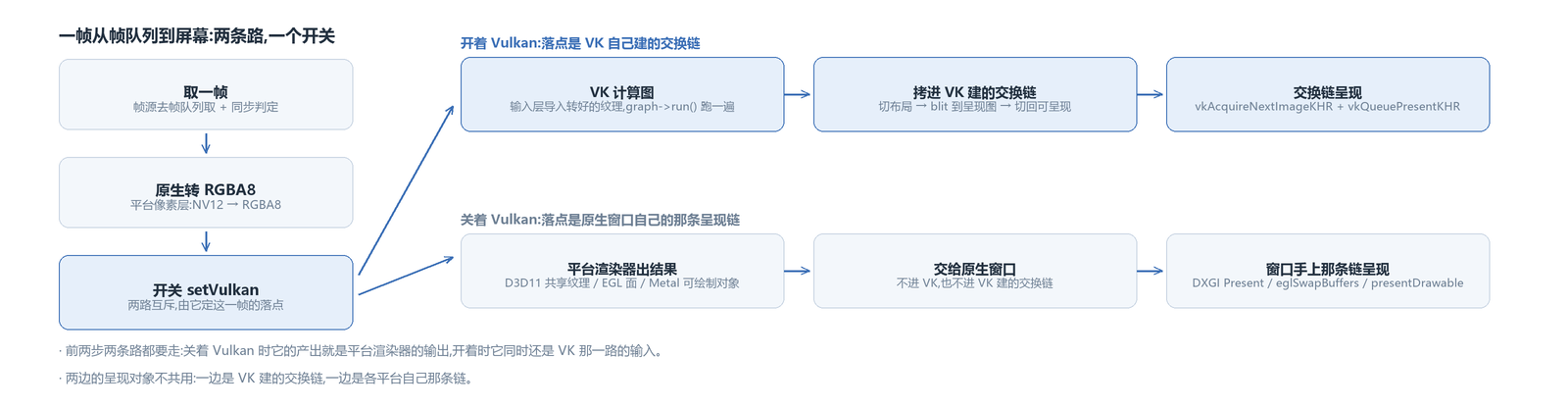
After pixel processing, a frame has two destinations. One hands it to Vulkan: it enters the compute graph, and when processing is done the result is copied into the swapchain Vulkan built itself, then presentation is requested. The other is direct presentation through the native window: the platform renderer hands the result straight to the native window, and the presentation chain in the window's hands puts it on screen — on Windows the swapchain's Present, on Android the swap buffer, on Apple submitting the drawable to the layer; this path does not go through Vulkan.
The two paths are mutually exclusive, and one switch decides which one plays: with the switch on, pixel processing hands the RGBA to Vulkan to take over; with it off, the result goes straight into the native window. Be clear about which step is exclusive — it is the presentation step. The platform pixel layer does that one RGBA conversion on both paths: with the switch on, its output is exactly the input of the Vulkan path, only its own copy does not go to the screen anymore.
The path that bypasses Vulkan is kept because it saves a hop. A hardware-decoded frame already lives on the platform's graphics API, and handing it to Vulkan means importing the texture across a graphics API boundary; direct native presentation does not cross that hop, and the picture neither lands in memory nor enters someone else's pipeline. The price is that the common image-processing chain is unavailable. So the choice is really between “processing” and “fidelity”, not between advanced and backward designs.
One more detail: the window pointer is sent down to both paths, every frame. The window's HDR passthrough state changes — switching screens or changing presentation mode flips it; which path uses it is decided only by that state.
The output format follows the window's actual state; no command from above can change it. A command can be rejected (the screen does not support it, the format cannot be obtained), and then the output has to fall back naturally to the normal domain; following the command instead would make command and reality drift apart. In practice this compares against the actual state every frame; if it differs from the cached one, a rebuild flag is set, and the next frame rebuilds the output side to match the actual state. The window pointer's lifetime is managed by the coordination layer; the pixel-processing layer only borrows it and does not hold it.
The Vulkan path: how a frame reaches the screen
With the switch on, a frame takes five steps.
Step one: the render callback receives a frame, hands it to the platform pixel layer for NV12 to RGBA8 conversion, then hands it, together with the GPU context produced on the platform side, to the Vulkan compute pipeline.
Step two: the graph runs inside the Vulkan pipeline. The input layer imports the already-converted texture, the whole compute graph runs once, and the result for this frame comes out.
Step three: push the window to refresh. In the window's refresh callback, the window pointer is sent down to both renderers at once (the platform pixel layer and the Vulkan pipeline) — the switch determines which one is actually using it.
Step four: the Vulkan path moves the compute result onto the swapchain image: transition the layout, copy the image over, then transition to the “presentable” layout. Be clear about which chain is being written: it is the image of the swapchain the Vulkan window built itself; the one in the native window's hands is untouched. When the compute graph is not ready yet (common on the first frame), only the layout transition is done and the copy is skipped, to avoid tripping validation-layer errors.
Step five: present — acquire the screen image, submit commands, request presentation, and the picture is up.
The Vulkan window object: create the surface, create the chain, present
The Vulkan window object handles three things: creating the surface, building the swapchain, and presenting.
Surface creation: the entry point is per platform — Windows builds a Win32 surface from the instance handle plus the window handle; Android builds from ANativeWindow; Apple builds from CAMetalLayer; Linux has two roads, X11 and Wayland each building its own. At compile time only one overload remains per platform, and the upper layer gets a generic window pointer. Re-attaching has a rule: changing to another video means re-attaching the surface, and the old swapchain must be torn down completely together with the old surface before the new one is built.
Swapchain creation: four values each involve a trade-off, and the values and the reasons are in the figure. The four govern different things: presentation mode governs synchronization behaviour, image count governs whether rotation has to wait, queue sharing mode governs whether two queues can touch the same image at once, and surface size is the most passive — the device decides it.

Presentation: submit commands, request presentation, and the result that comes back decides how the next frame goes — if it is out of date or the size does not match, the chain is rebuilt.
When the window changes, the chain is rebuilt
When the window size changes, the chain of events is this: the window layer notices the width or height changed and triggers a “size changed”; the Vulkan window overrides that action, waits for the device to go idle, and rebuilds the swapchain.
The rebuild does not destroy the old chain outright and start from zero — the old chain is passed as the “old swapchain” in the new chain's creation info, and Vulkan can reuse part of the underlying resources through it. If creation fails (the surface is minimized and the size is 0, say), it does not force its way forward: the swapchain pointer is restored to the old chain, failure is returned, and the next frame tries again. This is so an empty handle never keeps moving down the line — an empty handle carried all the way to presentation is a crash. Only after success are the old chain's resources (image views, framebuffers) and the old chain itself destroyed. When the size is 0 or no image can be acquired, this round is skipped outright and heals itself once the surface is laid out again.
The avox engine is open source on GitHub: github.com/xxxzhou/avox, and these three roles, the two renderers, the switch, and the Vulkan path's surface creation, swapchain creation and presentation are all in there.