The boundary: the class is C++, only the implementation file is ObjC++

The body of the decoder is a pure C++ class: there is no Objective-C object in the declaration, and the members are a few CoreMedia and CoreVideo handles plus standard-library containers. The implementation file has the ObjC++ extension, used so that system calls can be written directly inside the class methods.
There is exactly one place where ObjC syntax is really used: the property dictionary when creating the session, the only Objective-C object literal in the file. The other handles (data blocks, samples, dictionaries) are all C types.
The callback layer is handled the other way around: the decompression session wants a C function pointer, and what is passed here is a static function of the class, carrying its own pointer in as an opaque argument and casting it back inside the callback. That way the callback can live in the class without global variables.
Frame ownership is managed by hand: the image buffer received in the callback is retained once and put into the reorder buffer; after delivery, its own reference is released, and places that hold it long-term retain it themselves. Stream close and exception paths each release once as well.
The header guards Objective-C declarations with macros, and logging goes to standard output rather than the system log — no ObjC dependency is introduced anywhere on the chain, except that property dictionary.
The output originally left two paths: hand out a CPU buffer, or hand out an image buffer with an IOSurface. In this version “go through Metal” is fixed to true from construction, with no setter, so the CPU path is effectively sealed off — the output described below is all the image-buffer path, and frame retain and release follow image-buffer rules.
Creating and configuring the session
Before creating one, the old session is retired first: wait for asynchronous frame processing to finish, then invalidate and release it. Changing the film or the resolution both go through this step.
Turning the parameter sets into a format description branches by codec: H264 is built from SPS and PPS; H265 has three; VP9 supplies only the codec type plus width and height; AV1's parameter set is a config record sent inside an extension; ProRes takes it from the container's codec identifier.
The session itself is created with a property dictionary that carries only two things: the pixel format, and a “Metal compatible” switch. Not including the GL-compatible key is deliberate: on newer system versions the GL side has been removed, and including it would build the session on a deprecated path.
One step in the packet-feeding segment cannot be skipped: the data must be copied into a system buffer block, because once it is submitted the ownership of the data is handed over and the timing of the frame is no longer decided here. The sample carries both display and decode timestamps, plus two flags: allow asynchronous decompression, allow time processing.
Streams with multiple slices need one more step beforehand: the decoder wants “one sample per whole picture”, so the slices of the same access unit must be aggregated before feeding — an access unit being all the slices of one picture.
Reordering happens in the frame-output callback: frames are sorted by timestamp before being passed on, so they do not come out in the wrong order.
Output pixel format: decided by codec and bit depth
The default is an 8-bit planar format. 10-bit depends on the codec: for the two high-compression codecs when 10-bit, a 10-bit planar format is given; ProRes 10-bit gets a different format whose chroma is not subsampled.
There are two judgments that would rather give up this lane: one is when the codec spec requires 10-bit output and that format cannot be obtained, in which case it is reported as an open failure and the upper layer switches to the next candidate; the other is when the 10-bit output format is unsupported, and it gives up the same way — no silent fallback to 8-bit here.
The earlier “Metal compatible” is the premise of this implementation: the default output is an image buffer with an IOSurface, mapped directly into a texture by the render side.
Black screens and corrupted pictures: the cause is in the layer and the format
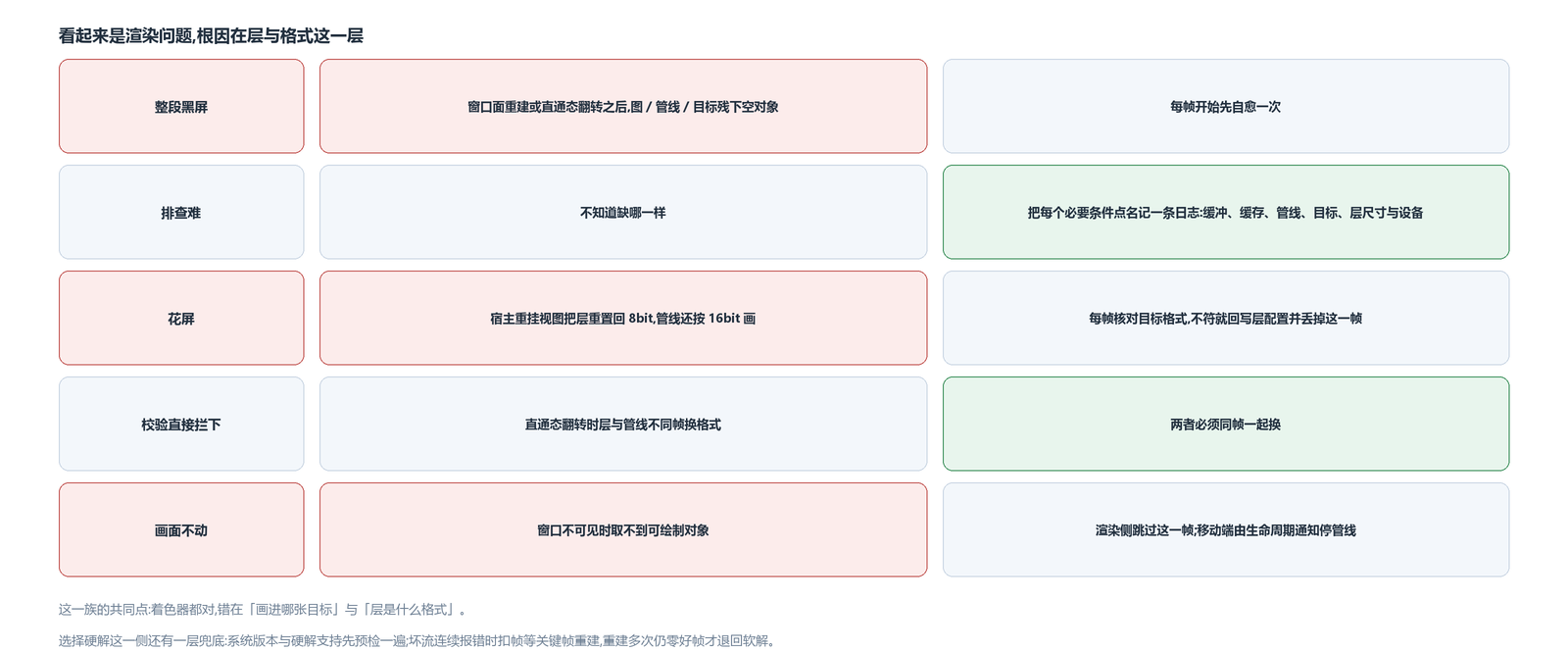
This family of problems all looks like it is in rendering, but the root causes fall into several kinds, taken separately:
Each frame starts with a self-heal pass: rebuild the image, pipeline and target, so a null object left behind after a window surface rebuild or a pass-through state flip does not leave the whole segment black.
Every missing prerequisite is logged by name: image buffer, cache, pipeline, target, and the layer's size and device. When troubleshooting, look at this group first.
The layer's format can drift: when the host reattaches the view, the layer is reset to 8-bit while the pipeline may still be drawing in 16-bit — drawing into an 8-bit target means a corrupted picture. The handling is to check the target's format every frame, and on mismatch write the layer configuration back and drop the frame.
A pass-through state flip must switch the layer and the pipeline to the new format in the same frame, or the validation stops it outright.
The layer's size is not managed on this side either: the host view is attached to the layer on the main thread, and the size comes from the view size multiplied by the scale. There is no listener for a display change, so if the host does not touch the view, this side has no way to know the size changed.
When the window is not visible, no drawable object can be obtained, and the render side skips the frame — on desktop no background flag is registered for this reason, and on mobile the app lifecycle notification stops the pipeline.
How it coexists with software decoding: precheck before open, self-heal during decode
This implementation is registered into the table by codec and marked as hardware. Whether it can be used is managed at two layers, in different places.
The precheck is before open: first whether the system version is high enough, then whether this machine supports hardware decoding for the current codec. If it fails, it is reported as an open failure — the upper layer does not need to know whether it was a version problem or a hardware problem; the candidate chain moves to the next one.
Bad-stream self-healing happens during decoding: when bad data arrives several times in a row within the same round, some frames are skipped first and the decoder waits for the next keyframe to realign; only if, after several rebuilds, there is still not a single good frame, is it reported as an open failure and the fallback goes to software decoding.
The avox engine is open source on GitHub: github.com/xxxzhou/avox, where this boundary, the session configuration and those format guards all live.