One conversion, two destinations
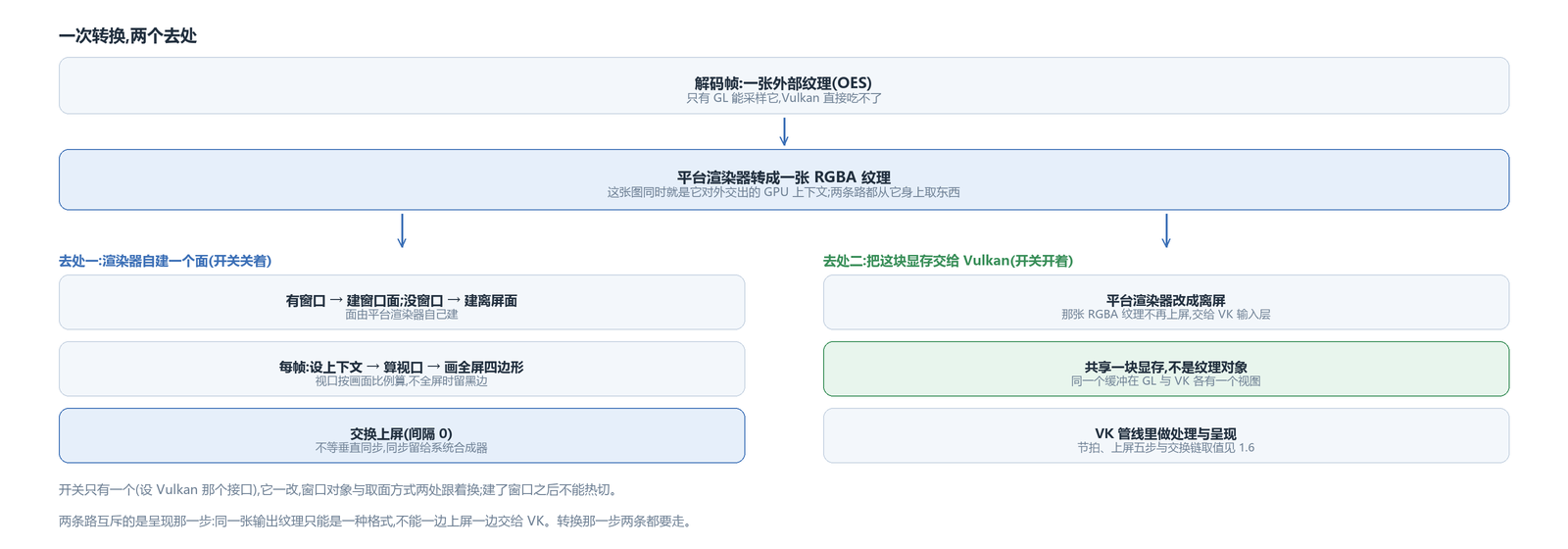
The decoder hands out an external texture, and only GL can sample it. The render side's approach is to convert it into an RGBA texture first: the platform renderer uses the external-texture sampler to draw this frame into its own image, and that image is also the GPU context it hands out, with both paths taking from it.
The conversion layer lives in the platform renderer, and both paths go through it. What is mutually exclusive is the presentation step after it.
Destination one: the renderer builds its own surface and presents directly
When the switch is off, what the window side hands to the renderer is a native window. The renderer builds a surface from it: with a window it builds a window surface, without one it builds an offscreen handoff surface (pbuffer).
The per-frame action is short: make the context current, compute the viewport by the picture's true aspect (leaving black bars when not full screen), draw the RGBA texture as a full-screen quad, then swap to present.
Swapping has vertical sync, but this layer sets the swap interval to 0. Synchronization on the screen side is left to the system compositor; this side does not wait.
This path involves the fragment-shader variants (the passthrough case uses a different sampling set); how those variants split was covered in the render-layering article, so I will not repeat it.
Destination two: hand this memory to Vulkan
When the switch is on, the window side becomes a Vulkan window object and the platform renderer goes offscreen — its RGBA texture is no longer presented but handed to the VK input layer.
What is shared at the handoff is not a texture object but a block of video memory. It takes three steps:
First allocate a buffer, 8-bit RGBA, with usage declaring it is only for GPU writes and sampling. Then wrap it in an EGLImage through EGL and bind that image as a GL texture — at this point the GL side can read and write it directly.
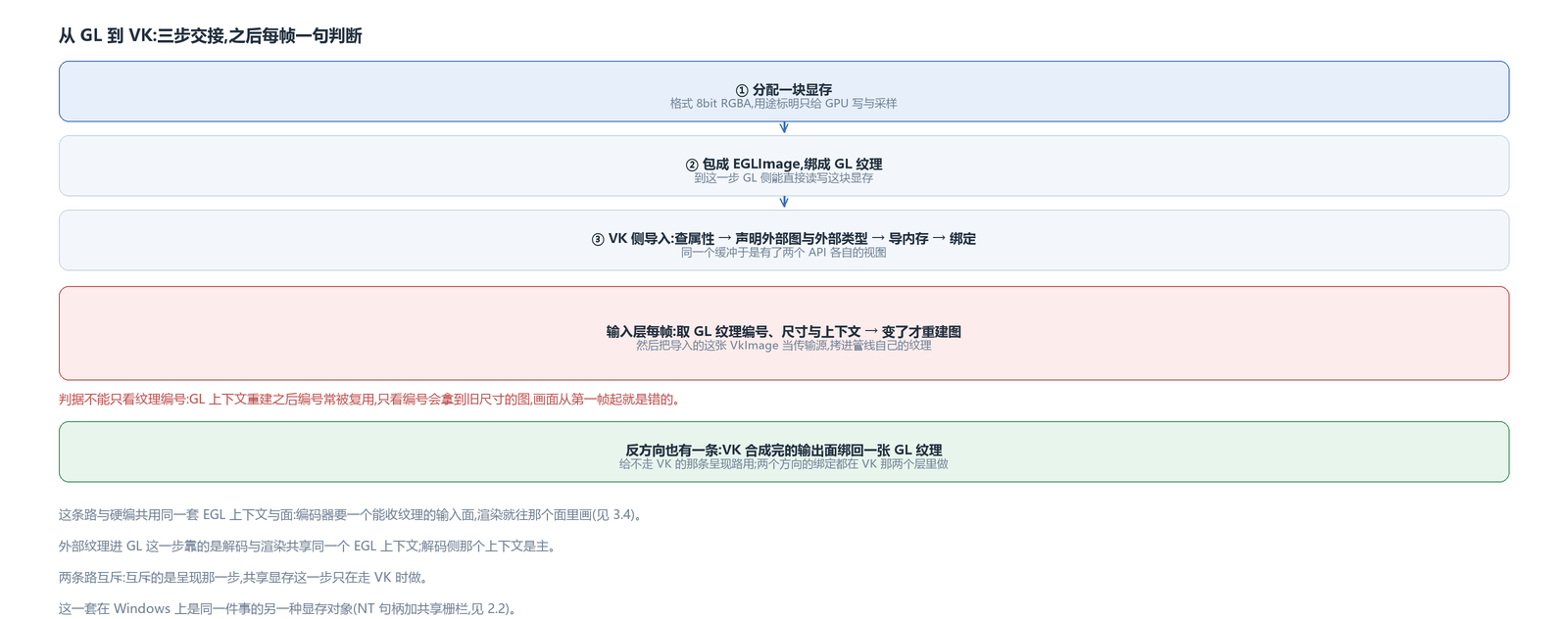
The VK side does the reverse: query the buffer's properties, declare at image creation that it is an external image of this buffer's external type, then import the buffer and bind memory. The same buffer now has a view in each API.
What the input layer does each frame: first take the RGBA texture's id, size and context from the GL side, rebuilding the image only when the size or texture is new; then use the imported VkImage as the transfer source and copy into the pipeline's own texture.
The rebuild condition cannot look at the texture id alone. After a GL context rebuild, texture ids are often reused; looking only at the id gets an image of the old size, and the picture is wrong from the first frame — so the context has to be judged together with it.
There is one in the reverse direction too: the output surface after VK compositing is likewise bound back to a GL texture, for the presentation path that does not go through VK.
The Vulkan switch: the window object and the renderer's surface source both change
There is only one switch (the set-Vulkan interface). Changing it flips two things: the window object becomes a VK window, and the platform renderer switches to offscreen surface sourcing. The UI default is off; to go through VK, turn it on explicitly.
The two paths are mutually exclusive, and what is exclusive is the presentation step — the same output texture can only be in one format, it cannot be presented on screen and handed to VK at once. The conversion step is taken by both; the presentation step is done by only one.
The buffer's format and usage, and one capability probe
Two parameters are fixed when allocating that memory: the format is 8-bit RGBA, and the usage is “GPU writes only, GPU sampling only”. The usage affects how the driver lays out the memory — without a CPU-read case it can place it somewhere more suitable. Conversely, if any step needs the CPU to read this buffer, this path does not apply and another one is needed.
Interop capability is probed once first: at startup it decides whether this device and system version support this kind of buffer; if not, this binding is skipped and it falls back to the more ordinary path where the renderer produces the picture itself.
System versions need one more accommodation: older NDK headers lack those buffer functions, so the code fetches them dynamically by name and treats a miss as unsupported. This is the same style as taking candidate names on the decoding side — the capability probe sits at the entry, instead of failing on some frame.
The offscreen surface, and the swap-interval trade-off
The renderer builds two kinds of surface: a window surface when given a window, an offscreen surface when not. The offscreen option exists for “no window but still a picture” uses: export, frame grabbing, or being handed to someone else as a handoff surface — the input surface an encoder wants is this kind of use.
Setting the swap interval to 0 is a trade-off: swap right after rendering, do not wait for vertical sync, lower latency, with screen-side synchronization left to the system compositor; the cost is possible tearing. This version chose low latency first.
The three platforms side by side
The same job uses different memory objects on the other two platforms; the skeleton does not change.
On Windows it is an NT handle plus a shared fence, and the reader has to wait on the writer on the CPU; on Android it is one buffer with a view in each API and no explicit wait between them; on Apple it is a system surface that relies on an agreed order (Metal produces first, VK takes over).
What all three share: one RGBA conversion, one memory object shareable across APIs, and the mutually exclusive presentation step.
Sharing the same infrastructure with hardware encoding
The hardware-encoding side uses this same set of EGL contexts and surfaces: the encoder wants an input surface that accepts textures, and rendering draws into that surface. So the action in this article — build a surface, draw into it, then swap — becomes encoder input when the surface changes.
The two destinations for hardware-decoded frames on Android: one lands on the chain the platform renderer builds itself, the other on the “shared memory → VkImage” handoff; what is shared is the conversion and the memory, and what differs is who presents.
The avox engine is open source on GitHub: github.com/xxxzhou/avox; the external-texture sampling, that shared memory and the VK input layer are all in there.