Device slots: three kinds of video device, two kinds of audio device
On Windows, video devices fall into three kinds — camera, window and monitor — and audio devices into two — microphone and sound-card loopback. Implementations hang below each kind, separated by slot: screen and window share one slot (the window-capture set), the camera takes another slot (the Media Foundation set), and audio takes the single WASAPI slot.
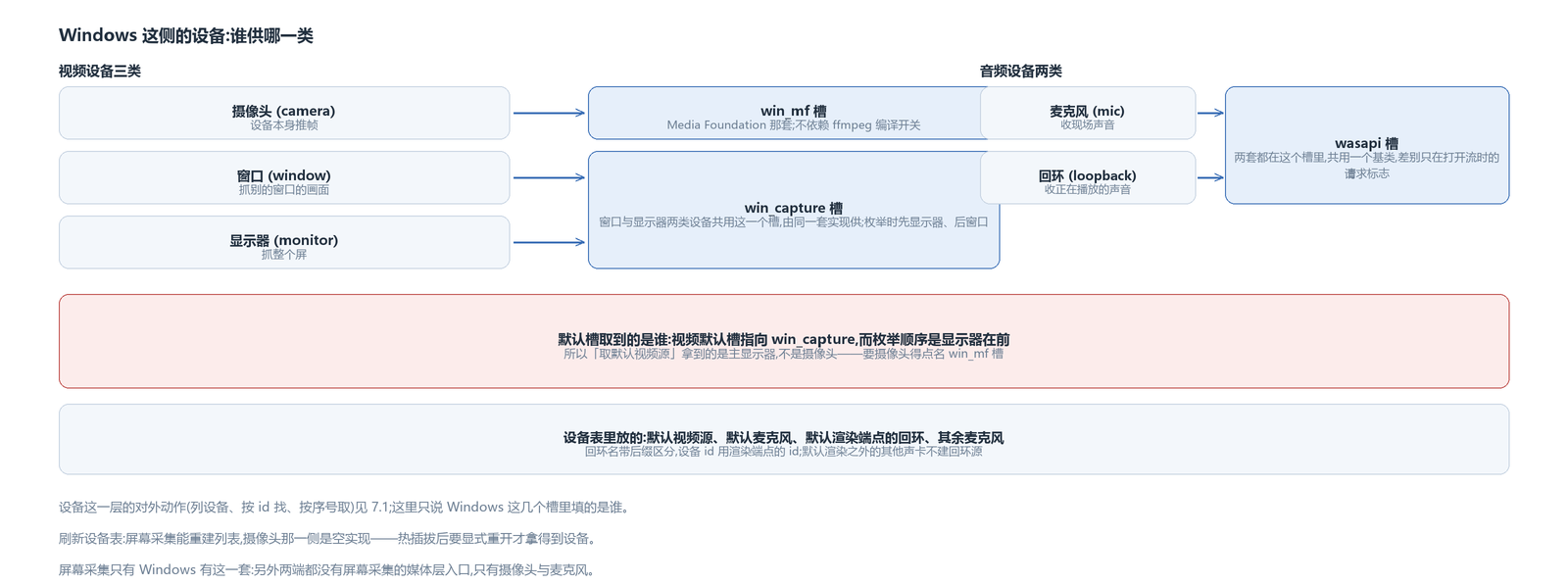
The default slot is taken per platform: on Windows the default video slot points at the window-capture set, and the default audio slot points at WASAPI. Asking for the default video source returns the primary monitor, not the camera. The reason is that this capture family enumerates monitors before windows, and “get default video source” takes the first entry in the device table — so unless you name the camera slot, what you get is the screen.
The two slots also register at different times: one hangs off the FFmpeg switch, the other does not depend on FFmpeg. Build with FFmpeg off and the camera still works, while the screen-capture set is not registered.
The device table itself, and the actions of listing devices, finding by id and taking by index, were covered in the frame-source article; here I only say who fills these Windows slots.
Screen capture: two ways to grab, WinRT is the main path
Screen and window belong to the same manager, enumeration lists monitors before windows, and capture has two implementations:
The GDI one takes a window device context plus a single BitBlt; it can only capture windows drawn through GDI — hardware-accelerated rendering and DWM-composited frames are out of reach, so it is only a fallback. The WinRT Graphics Capture one is the main path: if the system version is new enough, use it. Availability is probed once at startup; if the probe succeeds, RT is used, and only if it fails does the code fall back.
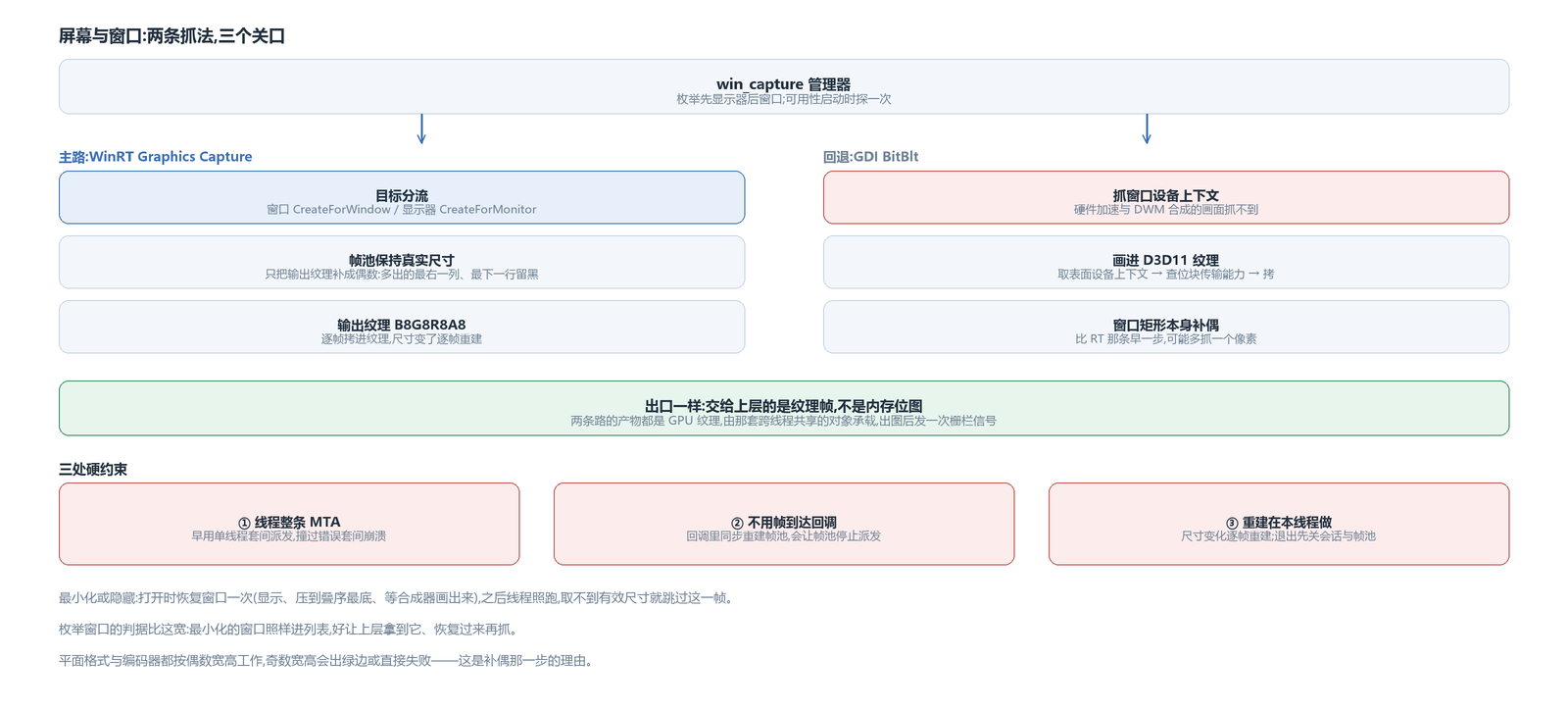
Target dispatch happens inside the RT path: window targets use CreateForWindow, monitor targets use CreateForMonitor. The two also get their width and height from different places: a window uses the window rect, a monitor uses the rect in its monitor info.
The fallback path also draws the picture into a D3D11 texture, not a CPU bitmap. It takes the texture's surface, obtains a GDI device context from it, checks that both sides support bit-block transfer, then copies across. The obtained context must be released after the copy, or the next capture gets no data. So the fallback path likewise hands out texture frames.
Rounding width and height to even, and what happens to a minimized window
Planar formats and encoders work on even width and height; odd values downstream produce green edges or fail outright, so both capture paths add a padding step on width and height, just in different places.
The RT path keeps the frame pool at the real size and only pads the output texture to even: the per-frame copy passes the source region at the real size, and the extra rightmost column and bottom row of the target texture are left untouched, staying black. The GDI path pads the window rect itself first, then captures at the padded size, so it can come out a pixel larger than the actual window.
A minimized or hidden window yields no valid picture. On open, the handling is to restore the window, push it to the bottom of the window z-order, wait a moment for the compositor to draw it, then capture as usual. This is done only once at open — the first time in each on/off cycle that the window is found invisible.
After that the capture thread keeps running; when the size step finds the window invisible or minimized it skips this frame and goes on to the next round — the thread does not exit, and there is no stop-capture action. The test used when enumerating windows is looser: minimized windows still enter the device list, so the layer above can take one, restore it and capture again.
Frame pool and threads: three hard constraints
The screen-capture path has three constraints learned the hard way, all written into the thread parameters.
The capture thread is initialized as a multithreaded apartment throughout. An earlier version used single-threaded-apartment queue dispatch and hit a wrong-apartment error followed by a crash; the whole thread was later moved to the multithreaded apartment.
Frame arrival does not use callbacks; instead the thread asks the frame pool for frames at a fixed cadence. The reason is that doing the “rebuild the frame pool” step synchronously inside the callback makes the pool stop dispatching later frames — the picture simply freezes — so the callback approach is dropped entirely.
Rebuilding the frame pool must happen on this thread. When the window size changes, the pool and output texture are rebuilt per frame; on exit, the session and pool are closed on this thread before the task ends.
Camera: asynchronous reads and a format whitelist
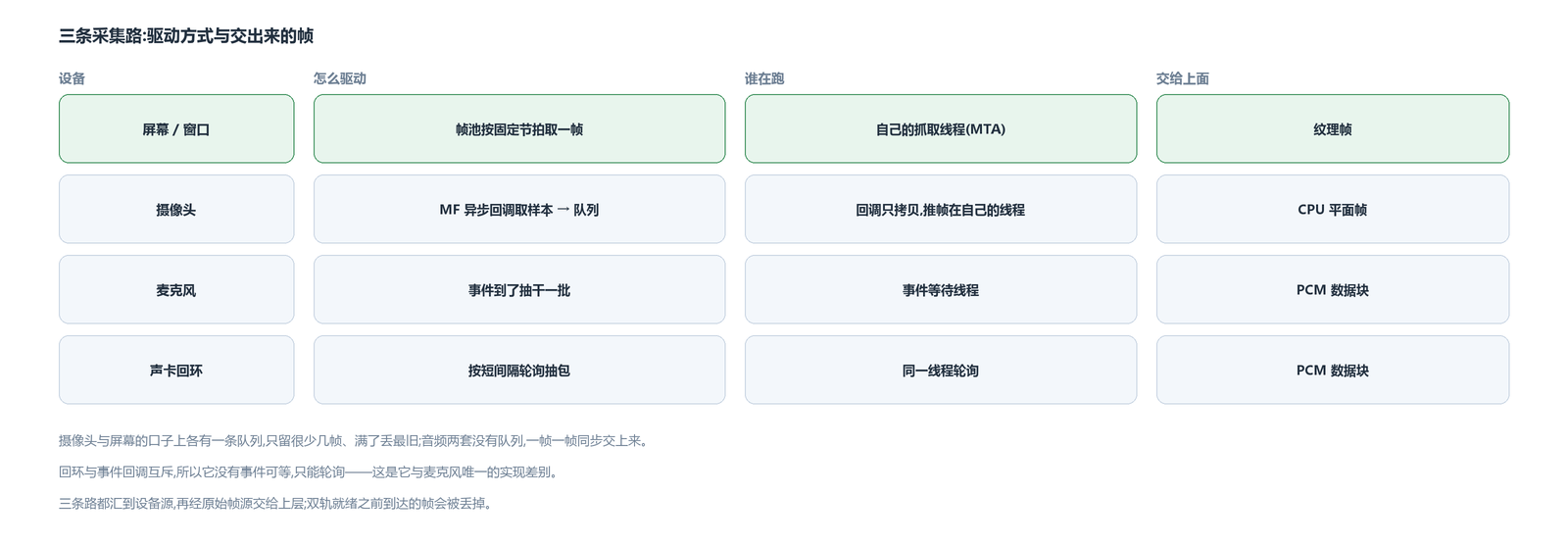
The camera goes through a Media Foundation source reader: an asynchronous callback is attached at creation; the callback takes the sample, copies the data into a queue, then immediately asks for the next frame. The copy happens on the MF callback thread, the frame push happens on our own task thread — the two are separate, the queue holds only a few frames, and when full it drops the oldest.
Not every format is accepted. When enumerating the formats a device supports, only NV12, YUY2, YVYU and UYVY — a few planar and packed YUV formats — are recognized; the rest are dropped outright. If a device has none that works, it does not enter the device list. The JPEG-compressed option is not dropped: the reader's output subtype is rewritten to YUY2, and MF's built-in decoder turns it into YUY2 before it goes downstream. Stride prefers the device-provided default and only estimates from the format when that is unavailable.
A read failure marks the device unopened and reports device loss. There is no hot-plug re-enumeration here — refreshing the device table is an empty implementation on the camera side; getting the device back requires an explicit reopen.
Closing the stream clears the queue first, then issues a flush and waits for the callback to return, with a timeout as a backstop. Releasing the reader without this wait risks a callback still in flight.
Microphone and sound-card loopback: the difference is only the request flags
The two audio capture sets share one base class; the only difference the subclasses provide is the flags used when opening the stream:
The microphone is event-driven: a thread waits on an event, and when it fires, drains this batch of packets. Sound-card loopback uses the loopback flag; loopback and event callbacks are mutually exclusive and cannot both be on, so there is no event to wait for and it can only poll for packets at a very short interval.
Opening works the same way: shared mode, open a buffer in the system mix format first, then read at a shorter interval.
The device table holds three things: the default microphone, the one loopback corresponding to the default render endpoint, and the remaining microphones. Loopback device names carry a suffix to tell them apart, and their device id is the render endpoint's id. Sound cards other than the default render endpoint get no loopback source.
Captured frames: three forms, one entry point
The three paths hand out different things. Screen capture gives texture frames, with the texture carried by that cross-thread shared object and a fence signal sent after the picture is produced; the camera gives CPU planar frames, with the memory being the buffer from the queue; microphone and loopback give PCM data blocks.
The device source joins the audio and video tracks into one, then hands it to the observer above through the raw-frame-source layer. The recording chain discussed later plugs in at this entry point — offline recording, encoding and muxing use the same batch of frames.
Until both tracks are ready, this layer drops frames; an early first frame is not held back and delivered once things are ready. The frames between opening the device and both tracks becoming ready are lost.
The avox engine is open source on GitHub: github.com/xxxzhou/avox; all three paths — screen capture, camera and WASAPI — are in there.