The two places hardware decoding leaves to the platform: decode device and frame output
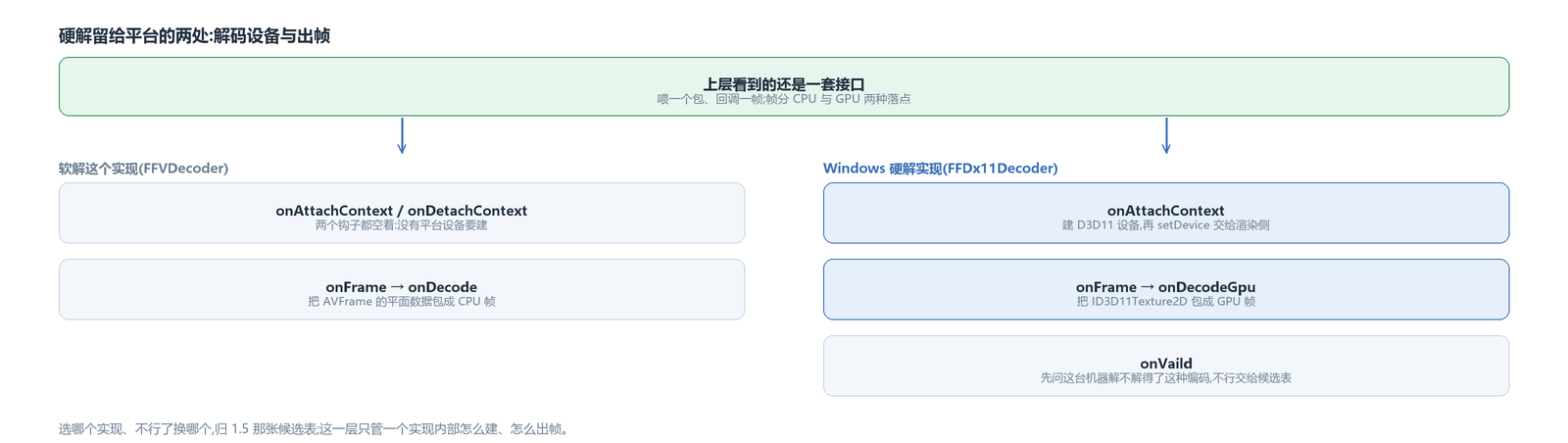
The decode line's interface was covered earlier: the upper layer feeds packets and gets frames back through callbacks, and frames land either on the CPU or on the GPU. Hardware decoding does not open a new line; it changes the product at the exit of the same line. So there is little for the platform to fill in: just two places.
One is the device. Before configuring the decoder, the FFmpeg decode chain calls a hook, onAttachContext, and at teardown it is matched by onDetachContext. The software decoder does nothing in these two hooks; platform hardware decoding creates the device needed for decoding here, and that is where platform differences enter.
The other is the moment a frame comes out. The base class's onFrame is overridden by each implementation: the software decoder wraps the planar data in the AVFrame into a CPU frame, the hardware decoder wraps the native texture from the decoder into a GPU frame and dispatches it through the onDecodeGpu callback. After dispatch, the frame enters the same frame queue and the same backpressure as the software path.
The upper layer touches neither; it still sees only “a frame”. Which implementation to swap in when one does not work is the business of the candidate table in the decode integration article; this article only covers how one implementation builds and how it outputs frames.
The Windows hardware implementation: decoder, device context and registry names
The Windows hardware implementation is FFDx11Decoder, which inherits two things at once: FFVDecoder, the shared software/hardware base class on the FFmpeg side, and Dx11Context, the device context interface the render side recognizes.
The second inheritance is the key to this path. A hardware-decoded frame has to reach rendering together with “which device, which texture”, and the render side asks for the device context interface to get those two. The decoder is itself the provider, so it inherits the interface directly. This also means there is no memory round trip between decoder and renderer, and no cross-device handle conversion: both sides use the same D3D11 device.
The names it registers in the decoder table are ff_h264_dx11, ff_hevc_dx11, ff_vp9_dx11 and ff_av1_dx11, all carrying the hardware flag (the naming rule is in the decode integration article). Registration happens only on Windows, and only when this build includes FFmpeg.
Two origins for hardware implementations: in-house and borrowed from FFmpeg

These four hardware decode lanes are not one approach: Android and Apple connect to the platform's native decode interfaces themselves (MediaCodec, VideoToolbox), and those two interfaces are easy to work with; for the Windows lane and the Vulkan alternative, I originally wanted to write them myself, but after evaluating it I borrowed the hardware acceleration FFmpeg already wraps. These two directions were also chosen because each graphics vendor's solution covers only its own hardware; DX11 and Vulkan are the general ones.
Writing them myself was abandoned for the same reason on both lanes: a hardware decoder has far more to manage than “calling an interface”. Internally it has to maintain a decode queue whose pictures have long references, short references and output references, and when a picture can be recycled is decided by those references; parameter sets also have to be parsed out of the bitstream and filled into the decode configuration. The FFmpeg layer already does all this: parameter set parsing, picture reference accounting, the texture pool.
Both in-house lanes were eventually set aside and did not make it into this build (src/avox_windows/dx11/Dx11VDecoder.hpp, src/avox_vulkan/decode/). To the upper layer, the two origins are indistinguishable — the candidate table hangs implementations per codec and tries them one by one in a fixed order (covered in the decode integration article).
The device is created by FFmpeg, then handed to the render side for reuse
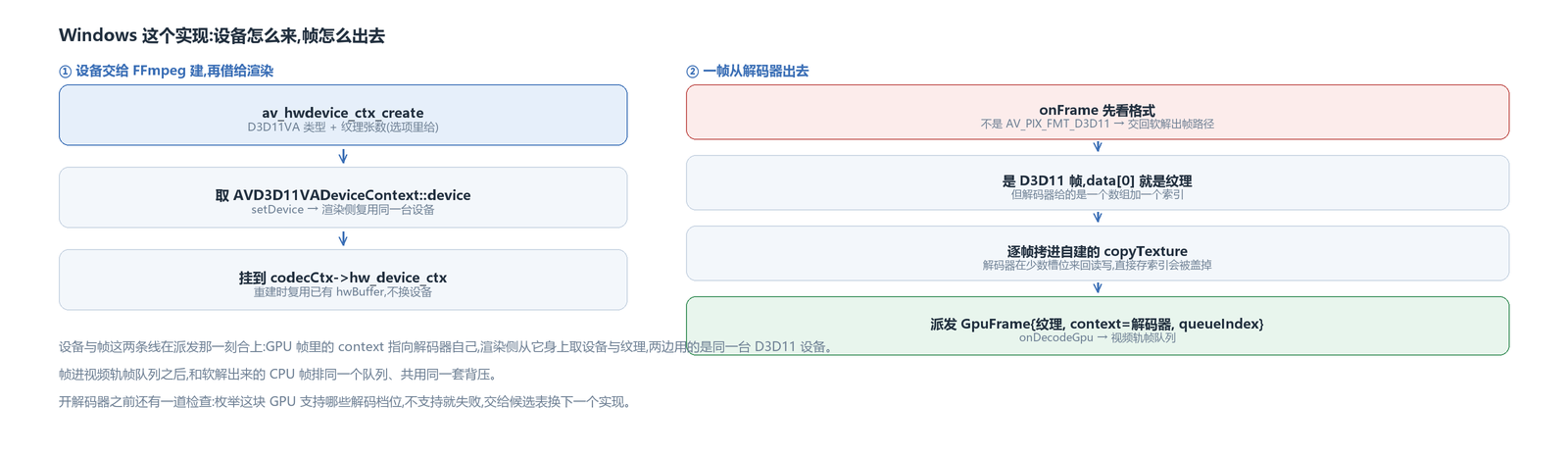
I did not create the device with D3D11CreateDevice. This implementation borrows FFmpeg's d3d11va: it calls av_hwdevice_ctx_create for a hardware device context of type D3D11VA, and two options can be passed in — how many output textures to leave for the decoder, and turning on the hwcontext debug layer in Debug builds.
After the context is created, the ID3D11Device inside is taken out and handed to the render side through setDevice. The render side then builds its textures and shaders all on this same device.
The context is then attached to the decoder (hw_device_ctx). Once attached, the output texture pool is derived by hwcontext from the count given earlier; I did not create an AVHWFramesContext myself. The output pixel format does not have to be chosen either — on the d3d11va side FFmpeg's hardware acceleration negotiates it; only the Vulkan implementation needs to specify it explicitly in get_format.
A seek or a configuration change rebuilds the decoder as a whole, but the device cannot be swapped for another one in that rebuild. The rebuild takes the reuse branch: if a hwBuffer already exists, it is referenced once and attached. What is at stake is not just time saved — the render side has already built its own resources on the device, and rebuilding it would leave decode and render each holding a different one, voiding all the convenience of “the same device”. The reference is released in the teardown hook.
What a hardware-decoded frame yields: one texture plus one index
The first thing onFrame does is look at the format. If it is not AV_PIX_FMT_D3D11, this frame did not actually go through hardware decoding, and it is handed back to the base class's software frame output path. This fallback is cheap, and it catches the case where “you think you are hardware decoding, but the decoder returned software”.
For a hardware frame, data[0] is an ID3D11Texture2D. But having the handle is not enough to dispatch it; there is a pit that has to be avoided here: the decoder gives an array of textures plus an index, and it reads and writes back and forth among a few slots. If the outside only records that index, by the time the consumer actually fetches the picture, that memory may already have been overwritten by the next frame.
So this implementation creates a texture of its own, copies that one into its own every frame, and dispatches its own texture together with a sequentially increasing index. When the size changes, the copy destination is recreated.
What is dispatched is a GPU frame: texture pointer, format and width/height, timestamp, plus context pointing at the decoder itself (the render side takes the device from it) and queueIndex marking which entry in the self-built array this is. The frame enters the video track's frame queue and lines up in the same queue as software-decoded CPU frames.
Enqueueing adds one more layer of wrapping: what the queue stores is a frame with a buffer object, and the buffer type says whose texture it is (dx11 on Windows, opengles on Android, metal on Apple). Without that type, downstream can only guess from context whether the pointer is memory or a texture; with it, rendering and recording each decide how to treat the frame by type. When switching from software to hardware or hardware to software, the type in this layer changes accordingly, and the frame object itself can be reused (buffer types and frame reuse are covered in the frame source article).
Size changes and the test for first assignment
Every time the decode thread receives a configuration packet it pushes it into the decoder, then checks whether width or height changed; if so it takes the size-change branch. There is one false positive that must be blocked here: the first time the size goes from zero to a valid value, that is initial assignment, not a size change.
The cost of not blocking it is not small. In this hardware implementation a size change triggers a full reset — the decoder is rebuilt and the packet queue cleared. For a local file, all packets are already queued when playback starts; once the queue is cleared, nobody feeds it again, the decoder just waits there, and the screen shows zero frames. I ran into this on an HDR source that repeated its parameter sets: the same SPS/PPS was fed in over and over, width and height reported the same values both times, but one side arrived before the other, and the check concluded “it changed”.
The test itself is simple: the old size has to be a valid value before a change may be declared.
The HDR and Dolby Vision metadata missing from hardware-decoded frames
When a hardware-decoded frame leaves the decoder, it carries only the picture itself. FFmpeg does not attach the two things — HDR static metadata and Dolby Vision reshaping data — to frames on the hardware side; only the software path has them. But upstream wants “tone map with this set of parameters during playback”, and without them the picture washes out or goes dead black.
The remedy is not to look on the frame but to go around the decoder: before packets are fed in, a side-channel scanner sweeps the raw bitstream, reading the static metadata segments in SEI and the Dolby Vision reshaping units; only when the values change is anything reported, through the two metadata callbacks from the decode integration article. It is done before format conversion, because after conversion the packets are no longer in their original form and what the scan finds cannot be trusted.
How the metadata is used once obtained is not in this article — that belongs to the HDR chapter.
Probe the GPU's decode profiles before opening the decoder
In this check, VP9 and AV1 in particular depend on the driver: the decode profiles supported by this device have to be enumerated, and if unsupported it fails outright so the candidate table moves on to try the next implementation, rather than guessing.
The profile GUIDs are hard-coded constants in this implementation. In the dxva headers they are macros, and referencing the macro directly leaves an unresolved symbol at link time, so a copy has to be made by hand. It is ugly work, but there is no avoiding it.
With that, the Windows implementation is complete: device, decoder, texture array, GPU frame, all the way to the frame queue. Where the frame goes next is the next article's subject — it has two destinations, one into the Vulkan pipeline for unified processing, one pasted straight onto the window.
The same abstraction fills two other holes on Android and Apple: on one side MediaCodec and its Surface, on the other VideoToolbox and the ObjC boundary. The skeleton follows this article's.
The avox engine is open source on GitHub: github.com/xxxzhou/avox, and this hardware decoding abstraction and this D3D11 implementation are all in there.