
Four managed layers, and the generated one is never hand-edited
From the bottom up: a tool generates a C# wrapper layer and a C-interface wrapper layer from the public headers; the layer above adds caller-friendly things on top of the generated files, which are brought in as links; above that sit the player control and the view models; at the top is the application, split into shared, desktop, Android and Apple modules.
The shape of the generated code deserves a note: the C-interface layer flattens every C++ object into an opaque handle and the functions are a flat list; the convenience layer adds what the managed world expects — object lifetimes tied to C# disposal, engine callbacks converted into managed events, parameters packed into structs instead of bare pointer chains. The player control the UI needs is built on the convenience layer and never touches the generated files. The handle types are settled per platform as well: on Windows a window handle plus an instance handle, on Android a native-window pointer, on Apple a Metal layer pointer — the host receives one of these three, and there is no fourth.
The convenience layer pulls the generated files in through a wildcard compile item in the project file: the whole generated directory is linked in, shows up in the IDE as a virtual folder, and the files stay where they are. Rerunning generation touches only that directory, and the convenience layer's project file never changes.
Where this managed layer came from is also worth a note: most of the code was generated by a large model against a project rules file — naming, the scope allowed to change, comment format all written into the rules — and I make detail adjustments on top of the generated code. The more specific the rules file, the less cleanup the output needs; whatever disappoints goes back into the rules and is fixed in the next round.
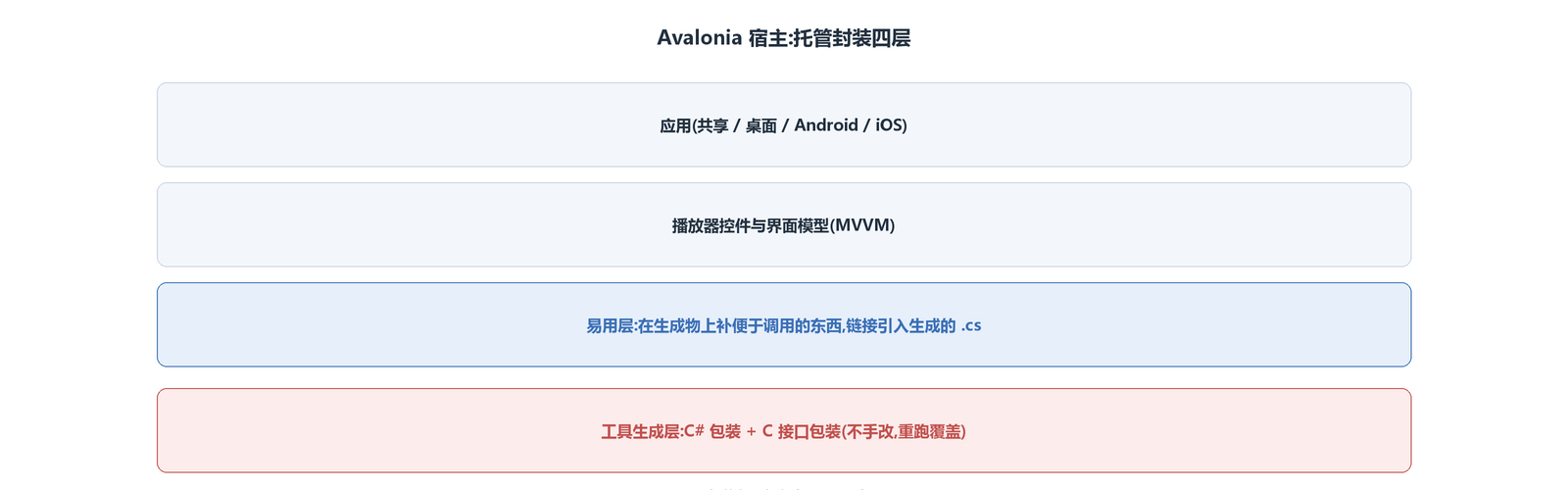
This split carries exactly one critical discipline: the generated layer is never hand-edited, because rerunning generation overwrites it wholesale; anything new goes into the layer above. The cost of hand edits does not show up on the spot — the next regeneration makes the changes vanish silently, and they return at runtime as missing entry points.
Video frames skip Avalonia's rendering; handles come from the native control
Avalonia renders its own UI, but a video frame — whether through Vulkan or the platform's DX11 or Metal — needs a native window to build a swap chain; the render-layering article covered how surface creation splits per platform. Avalonia offers no way to graft an externally rendered result into its own render tree; what it offers instead is a front door: a container that hosts a native control (NativeControlHost). I place a native control in the page, take its platform handle, and hand the handle to the engine; when the control is destroyed, passing 0 unbinds. All three platforms take the handle from the container's created callback, by three different routes.
As far as the engine is concerned, it never learns what framework the host is: what comes in is a handle, what goes out is a picture, and wherever the layout system gives the control a rectangle, the native window sits there. That is the whole contract, which is why swapping UI frameworks changes nothing on the engine side.
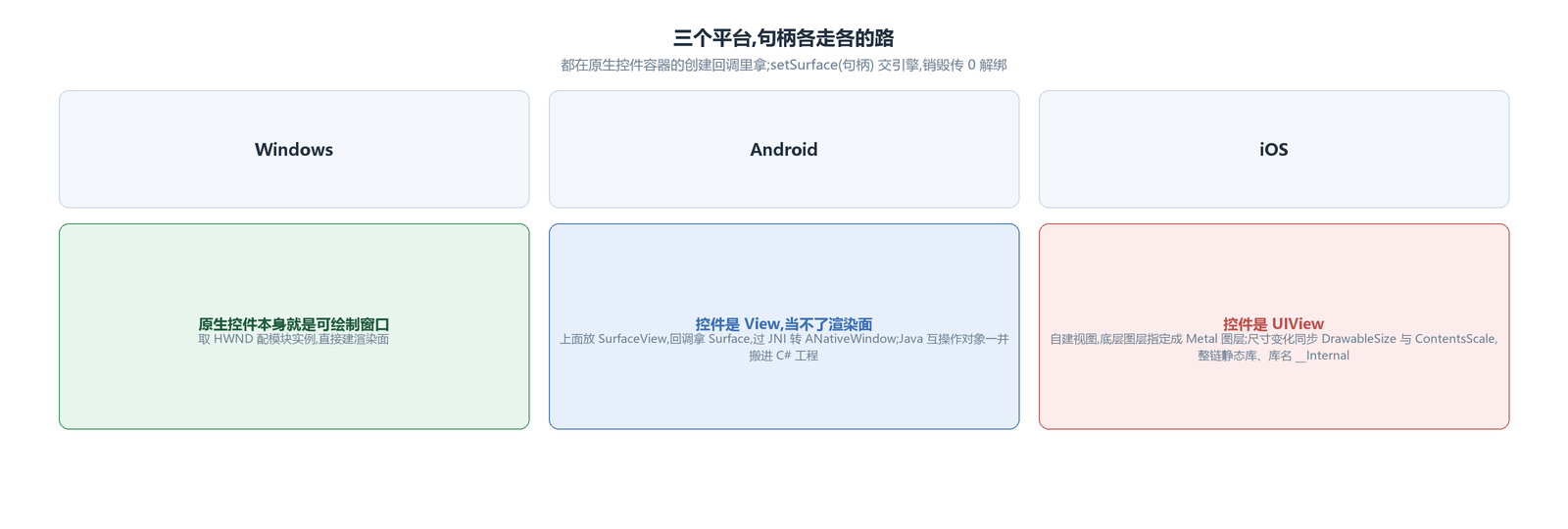
Windows is the most direct: the native control is itself a drawable window, so its window handle plus the module instance go straight into building the render surface.
Android passes through JNI in the middle: the native control is a View and cannot serve as a render surface, so a SurfaceView is placed on top of it, the Surface is taken from the holder's callback, and JNI converts it into the native-window type for the engine. Beyond that step there is a move: the Android-side "C++ calls Java" objects — audio capture, SurfaceTexture and the like — come along into the C# project. The Java sources are placed under their original package names in the C# project's directory, the project file declares that it includes these Java sources, and the underlying shared libraries are linked into the package by ABI directory as well; when the app starts, the entry point makes one JNI call into the initialization entry and passes the main Activity — the resource manager the engine needs later is taken from it. Once the move is done, the engine's Java-calling half keeps working as before, and C# gains exactly one initialization call.
The control layer itself also builds per-platform targets: one project produces desktop, Android and Apple targets at once, platform differences fenced off with conditional compilation symbols, and Android-specific package references hung under their target's condition — without that switch, a desktop build would drag the Android dependencies in with it.
On iOS the native control is a UIView, also not a render surface. The approach is to build a view of my own, assign its backing layer as a Metal layer (CAMetalLayer), and hand the layer pointer to the engine. When the view's size changes, the drawable size and the scale factor must be updated in step — miss either and the picture distorts at best, or blurs across the whole frame on a high-resolution screen at worst, because the engine renders at the old pixel count while the layer displays at the new size.
The window's lifecycle follows the page
The native control lives inside the page; navigate away and the control is destroyed. So unbinding is not optional: the destroyed callback passes 0, the engine tears down the render window; navigate back, the control is rebuilt, the handle is handed over again, and the swap chain is built anew. Skip the unbind and the engine is holding a native window that is already dead while rendering keeps feeding frames into it.
iOS: the whole chain static, the library name __Internal
Windows and Android run on dynamic libraries; iOS, because of signing and distribution, merges the whole chain into static libraries: the generated C# wrappers are generated against a static-library target and the P/Invoke library name becomes the internal reference (__Internal, as the SWIG dllimport sets it) — after static linking there is no separate shared library to find, every entry point lives in the main program; the engine and the third-party libraries it carries must be static too, and the referenced system frameworks are declared in the outermost packaging parameters. Miss one step and the runtime hands back a pile of unresolved symbols: the error names the dynamic library it cannot find, while the real cause is the generation target not set to static — the error site sits several layers away from the disease.
One horizontal pass over the three platforms: the common points are where the handle comes from (taken in the created callback, returned in the destroyed callback) and the engine's ignorance of the host framework; the differences are only the handle's kind and whether JNI sits in the middle. One C# UI, a small patch of platform code on each side, and all three run.
The engine avox is open source on GitHub: github.com/xxxzhou/avox, where the managed wrappers and this handle route live.