
Three kinds of subtitles, three routes
Start with where each route comes from. Packets of embedded tracks are bypassed straight out of the demuxer and never enter the audio or video queues; only after a track is selected are they forwarded to the view. External subtitle files are read in by the engine's own parsers. Speech-recognition output is fed in from the layer above — recognition itself does not live in the engine; the engine only accepts the text lines with timestamps that it produces.
Styled subtitles (ASS, SSA) carry a typesetting language of their own: positioning, animation, fonts and karaoke per-character coloring are all script instructions. Flatten one into a plain text line and all of it is lost, so it must be handed to a typesetting engine to be restored. Bitmap subtitles (PGS) are the Blu-ray family: small timestamped bitmaps plus a palette, with no notion of text, font or style — the only thing to do is overlay images at their coordinates. Text subtitles (SRT, mov_text, recognized text) are the plainest; I rasterize them into bitmaps myself.
The three routes each draw their own way, and the product is the same thing: a transparent canvas cropped to the content's bounding box. Mixing is left with exactly one move: blend the canvas over the picture with sourceOver. The benefit of this constraint shows clearest when I wire up a new platform — what I write is a canvas blending layer, not a subtitle rendering system. The four render backends are four implementations of the same contract, each handling only its own color space and blending mode.
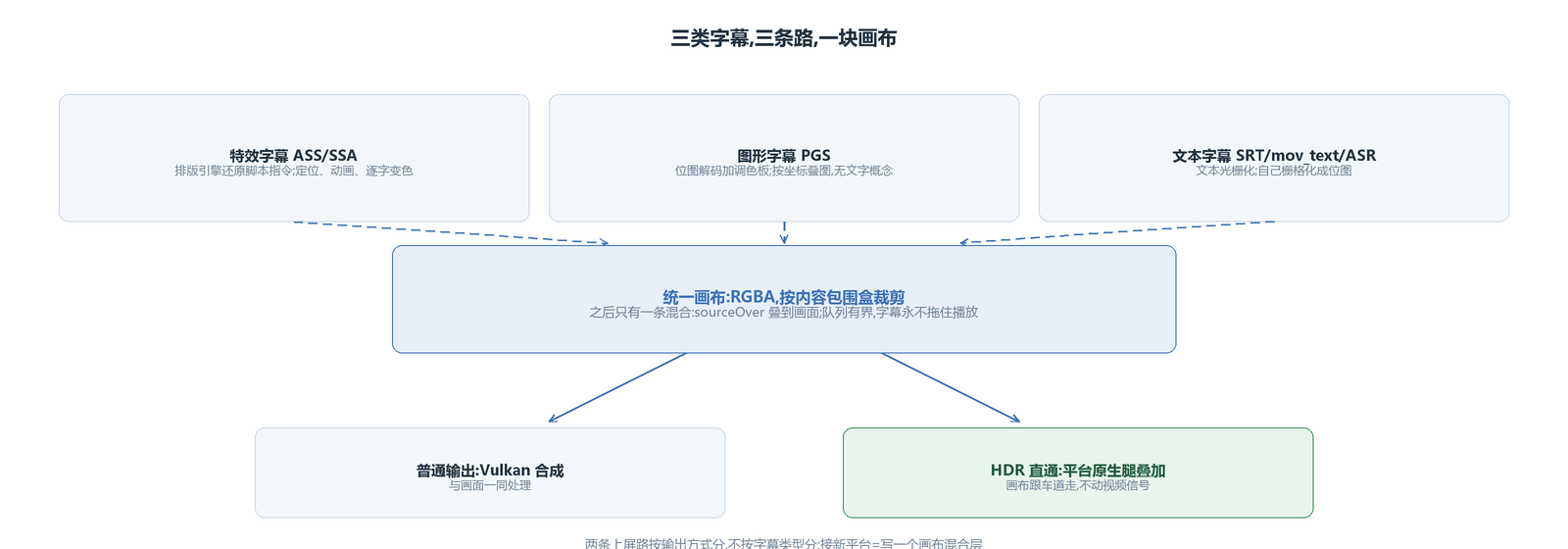
The canvas has two routes onto the screen, split by output mode, not by subtitle type: ordinary output goes through Vulkan composition and is processed together with the picture; in HDR passthrough output, the canvas switches with it to the platform-native rendering leg and only performs the overlay, leaving the video signal untouched. The specifics of that fork and its color spaces belong to the next article.
One winner: three-slot arbitration
Subtitles come from three sources: embedded tracks, external files, and speech-recognition output. All three are pushed into the view, but only one is displayed at any moment — three slots, the most recently activated wins, and an empty window does not fall back. Selecting an embedded track, loading an external file, or the first recognized line of text — any of these displaces the current winner; once the winner is removed, the picture does not fall back to the previous route. On the UI side this means that removing an external subtitle leaves the subtitle area quiet, with no embedded track suddenly taking over.
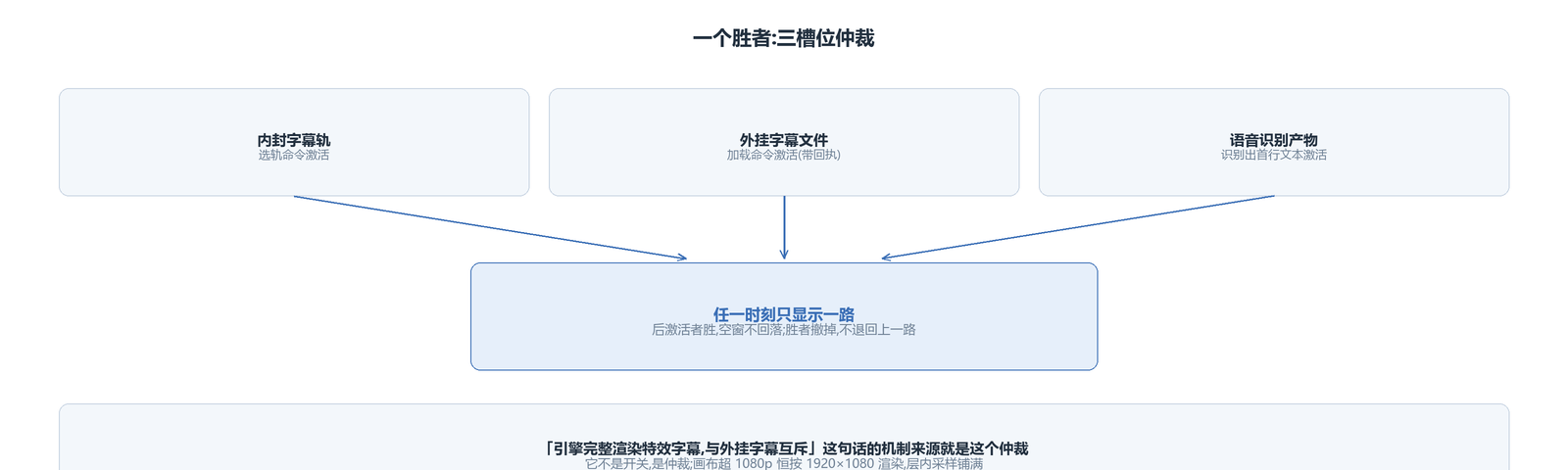
This single-winner semantics is the mechanism behind the UI line that the engine renders styled subtitles in full and is mutually exclusive with external subtitles. It is not a switch; it is arbitration.
Canvas size involves an engineering trade-off: for content above 1080p the canvas is always rendered at 1920×1080 and then stretched to fill by in-layer sampling. A 4K canvas costs over thirty megabytes per frame, and shrinking it to a third is nearly invisible to the eye; at 1080p or below the canvas matches the frame one to one. A word on the performance magnitude: plain-text rasterization in a 1080p steady state costs a few hundredths of a millisecond per frame, the increment for active styled-subtitle frames targets a few milliseconds, and idle segments cost nothing. The queues are bounded too: 512 text chunks per track, and PGS canvas frames are taken by playback position with the oldest dropped on overflow. Subtitles never hold playback back under any circumstances.
Styles belong to the source; what is adjustable is global
An ASS script's fonts, colors and positions are written into the source's script — they belong to the content. The script header is half of this: style definitions and resolution information all live in the header, and dialogue events merely hang content on those styles, so loading the script header on track switch is the precondition for styled subtitles to lay out at all. Interfaces that restyle by a single parameter are silently ignored for styled and bitmap subtitles. To change anything, go through the script layer: font size goes through the typesetting engine's scaling, which re-layouts immediately without reloading the subtitle; beyond that sit three global transforms — overall scale, offset and opacity. External plain text uses the built-in font, with its size following the picture height.
Encoding is another invisible boundary. Garbled SRT is almost always an encoding problem: GBK read as UTF-8 comes out as a string of diamond question marks. The strategy on the chain is strict UTF-8 validation first; if it fails, hand over to GBK and GB18030 transcoding and strip the BOM along the way. Bitmap .sub and VobSub are not on the support list; the format whitelist is ASS, SSA, SRT, mov_text and PGS.
Three real incidents
Incident one: switching tracks always crashed. For a certain class of files, switching to an embedded subtitle and back to the external one crashed every time, and a second switch froze the whole player. I pulled out two independent mechanisms: on track switch the typesetting engine's overlay was destructed outside the lock while the render thread and the IO thread were still dereferencing it inside the lock; and the canvas layer was detached and re-attached on every switch, triggering a full-image rebuild, and the second rebuild wedged inside the graphics driver. Two fixes: the overlay state is now removed inside the lock and destructed outside it, with the canvas content copied into a stable snapshot; and the canvas layer became sticky — once attached it stays for the whole playback, and with no subtitles only the content is cleared.
Incident two: yellow text turned cyan. On a 4K Blu-ray master, PGS subtitles sat in the wrong place and came out small, and the true cause had two layers. PGS coordinates are written on a 1080p graphics plane, so pasting them 1:1 onto 4K frame pixels misplaces them by construction; and the palette's channel order is blue-green-red while the code read the low byte as red, so yellow rendered as cyan. The bug stayed hidden a long time because white text has three equal channels and shows nothing wrong. The fix resamples on the decode side onto the composition canvas and repairs the channel order along the way.
Incident three: a whole line of hollow boxes. On iPhones, Chinese subtitles rendered as a full row of hollow boxes while English in the same frame was fine. The box count grew with the character count, not the byte count, which points at the font layer: on iOS the typesetting engine looks up glyphs through the system text framework, and its fallback chain for missing glyphs points at a private system framework that cannot be opened inside the sandbox, so every character landed with no glyph. The fix: before the typesetting engine initializes, feed it the fonts bundled with the app package, so the first thing it gets is a usable glyph source.
The engine avox is open source on GitHub: github.com/xxxzhou/avox, where this chain and all three fixes live.